Key Takeaways
- The three metrics worth tracking weekly are demo completion rate by stage, feature engagement by persona, and stakeholder expansion rate at the account level.
- Demo + CRM integration pushes engagement data (completion %, feature views, sharing activity) into Salesforce, HubSpot, or Clari in real time, replacing manual rep logging.
- Field mapping turns demo behavior into actionable CRM signals, for example “Demo Completion %” becoming a Buyer Engagement Score that drives routing, scoring, and follow-up.
- Five high-impact workflows: auto-route by drop-off, trigger follow-ups by completion percentage, capture stakeholder expansion, score accounts for ABM, and run loss-reason analysis on stalled deals.
- Demo engagement closes the attribution black hole between “meeting attended” and “proposal sent,” giving RevOps a behavioral signal that improves forecast accuracy.
- Internal customer benchmarks point to roughly 34% faster cycle time for deals where demo engagement fed directly into rep follow-up logic.
Your CRM is blind on the highest-intent moment in the deal
Most CRMs are flying blind on the highest-intent moment in the buying journey. They know a demo happened. They do not know what happened inside it. Did the prospect skip the pricing page? Did they linger on the integrations tab for four minutes? Did they share the link with three stakeholders before the next call? Without that data, reps are guessing where deals stand.
That gap costs real money. Gartner predicts that 70% of routine sales tasks will be automated by 2030, but automation only works if the underlying data is rich enough to act on (Gartner, The Future of Sales 2030, gartner.com/en/sales). Demo engagement is one of the cleanest intent signals in B2B, and most teams are not capturing it inside the systems where deals actually get worked.
Here is what changes when your interactive demo platform (a clickable, self-guided product walkthrough) talks directly to your CRM: forecasts get sharper, follow-ups get faster, and deals that would have stalled get caught early. This post breaks down how interactive demo CRM integration works in practice, the workflows it creates, and the metrics that prove it out.
What demo + CRM integration actually means
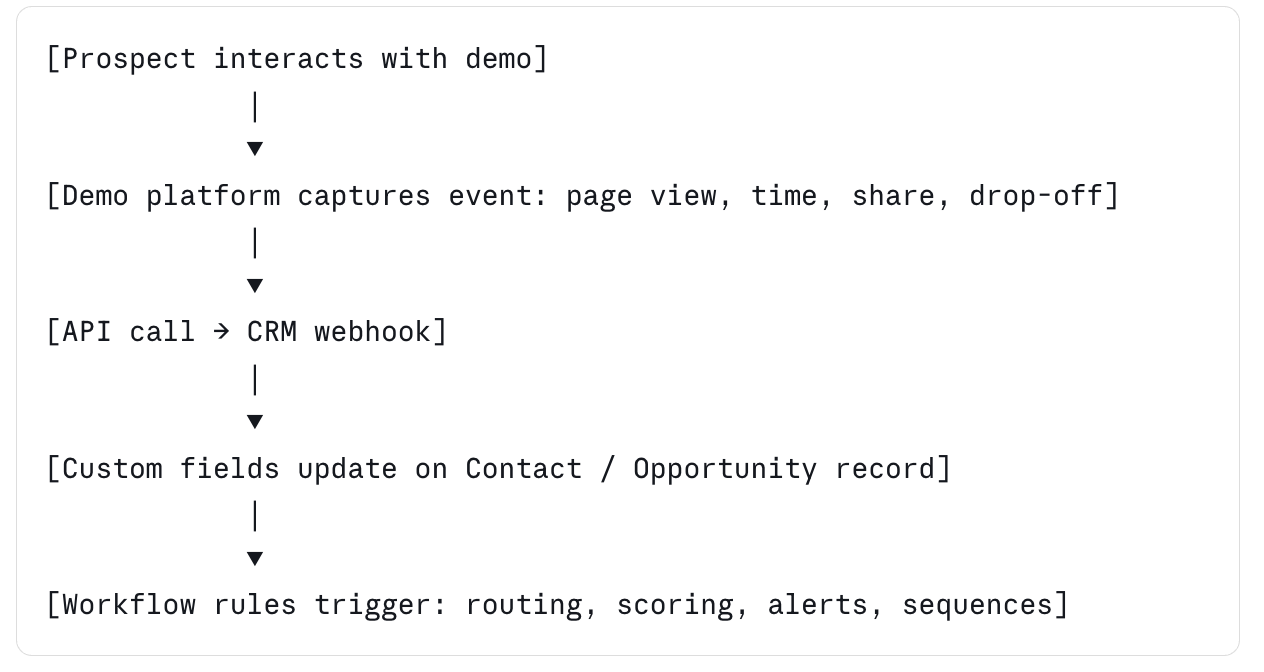
Demo + CRM integration connects your interactive demo platform to systems like Salesforce, HubSpot, or Clari so engagement data updates deal records automatically. When a prospect clicks through a personalized demo, every interaction (page views, time spent, features explored, sharing activity) flows back into the CRM in real time.
This is different from manual logging. Reps do not paste demo links into notes. The CRM record updates itself based on what the prospect did inside the demo. Custom fields like “Demo Completion %” or “Buyer Engagement Score” populate automatically, and downstream workflows fire based on those values.
The shift matters because most B2B buying signals live outside the CRM: email opens, page views, demo activity, content downloads. Pulling demo engagement specifically into the deal record gives reps a leading indicator of intent far more reliable than meeting attendance alone. Gartner reports that 80% of sales leaders will consider AI integration in sales workflows a critical competitive factor by 2030 (Gartner, The Future of Sales 2030, gartner.com/en/sales). Demo data integration is one of the cleanest places to start, and it pairs directly with the forecasting case we make in Why Your Demo Metrics Are Wrong: What to Track Instead.
How demo data flows into Salesforce, HubSpot, and Clari in real time
The integration runs through native CRM apps or webhooks. When a prospect opens or interacts with a demo, the demo platform fires an API call to the CRM, mapping engagement events to specific fields on the contact, account, or opportunity record.
Here is what a typical field mapping looks like in production:
- Demo completion percentage maps to a custom field “Buyer Engagement Score”
- Pages viewed in demo maps to “Demo Pages Engaged”
- Time on highest-value page maps to “Pricing Interest Signal”
- Demo shared with another contact maps to “Stakeholder Expansion”
- Drop-off page maps to “Last Feature Viewed”
These fields plug into existing scoring models, lifecycle stages, and routing rules. A demo that hits 85% completion and gets shared with a new contact triggers a different workflow than one that drops off at the second page.
This is where Walnut‘s AI suite earns its keep. InsightsAI auto-analyzes demo engagement patterns and pushes the most actionable signals, which features got attention, where prospects dropped off, who else viewed the demo, directly to the deal owner inside Salesforce or HubSpot. Reps do not dig through a separate analytics dashboard. The integration layer turns demo behavior into a signal the CRM can act on without rep input.
Five sales workflows you can run when demo data flows into your CRM
Once the integration is live, the workflows compound fast. These five move the needle.
1. Auto-route based on demo drop-off
If a prospect skips features tied to their use case, say the integrations tab when they are evaluating you for an integration-heavy workflow, that is a flag. Set a workflow that notifies your sales engineer and assigns a follow-up task to address the missed feature. Without the integration, that signal stays invisible until the call where someone says “we didn’t realize you did that,” by which point the deal may already be in a competitive evaluation.
2. Trigger follow-up sequences by completion percentage
Demo completion percentage is one of the cleanest intent signals in B2B. Set thresholds that trigger different sequences: 0 to 25% completion into a re-engagement nurture, 25 to 75% into standard rep outreach, and 75%+ into priority follow-up within 24 hours. This automates what reps do manually and inconsistently, and it makes pipeline reviews faster because completion percentage sits next to every open opportunity.
3. Surface stakeholder expansion automatically
When a prospect shares your demo with a new email address, that is a buying-committee signal. Set a workflow that creates a new contact record, ties it to the opportunity, and notifies the rep within minutes. Most B2B deals stall because the original champion cannot sell internally. Catching new stakeholders the moment they engage gives reps a window to multi-thread before the deal goes cold.
4. Score accounts by aggregated demo activity
For ABM motions, roll up demo engagement at the account level. If three contacts at the same target account watched the same product flow within a two-week window, the account score should reflect that. Tools like Clari and 6sense plug in directly, so demo engagement becomes one of the inputs that determines which accounts get prioritized for the next outbound sprint.
5. Trigger loss-reason analysis on stalled deals
When a deal sits in the same stage too long, pull the demo engagement history into the loss-reason analysis. A prospect who never made it past the second page is a different problem than one who viewed every feature and still went silent. That separates “did not see the value” from “saw the value, decided against it,” two problems with two different fixes, and it builds a sharper feedback loop into product marketing and enablement.
For the tactical build-out of these workflows, see the companion tactical guide, How Interactive Demo Data Transforms Your Salesforce and HubSpot Workflows.
What to get right before you turn the integration on
The integration itself is the easy part. The hard part is producing signal your team will actually use. Three setup decisions matter most.
Field mapping discipline comes first. Do not push every demo event into the CRM. Pick the four or five fields that map directly to existing scoring or routing logic: completion percentage, top feature engaged, drop-off page, sharing activity, and last-active timestamp cover most use cases. More fields than that create noise and dilute the signal. The cleanest setups start with one custom field tied to one workflow, then add incrementally.
Stakeholder alignment between RevOps and marketing comes next. Marketing usually owns the demo platform; RevOps owns the CRM schema. If they do not align on field naming, scoring weights, and trigger definitions before launch, the integration produces conflicting reporting. Make ownership explicit: one person on each side signs off on every new field and workflow. It sounds heavy. It saves months of cleanup.
Data hygiene at the demo level comes third. Bad demo data produces bad CRM signal. If demos are inconsistent across reps, engagement data will not be comparable, and 60% completion on one demo means something different than 60% on another. Standardize the demo templates first, then turn on the sync.
Why demo data fixes the attribution black hole in your CRM
Most CRM attribution stops at “meeting attended.” Forecasts pull from stage progression, deal age, and last activity date. None of that captures whether the buyer actually engaged with the product.
That is the attribution black hole: a long gap between “meeting attended” and “proposal sent” where buyer intent is invisible to the system of record. Reps fill it with subjective notes like “call went well” that do not roll up into reporting and do not help forecasting.
Demo engagement closes the gap. When a prospect’s interaction with the product becomes a tracked field on the deal record, you can finally measure intent between meetings, and forecasts improve because they include behavioral data, not just stage age.
Gartner found that 64% of sales organizations modify their sales strategy two or more times per year (Gartner, The Future of Sales 2030, gartner.com/en/sales). That much churn requires better signal. Teams that route deals by demo intent see meaningfully shorter sales cycles, with internal customer benchmarks pointing to roughly 34% faster cycle time for deals where demo engagement fed directly into rep follow-up logic (From Demo Data to Closed-Won). The exact lift varies by motion and segment, but the directional pattern holds across teams running the workflow.
Metrics that actually move pipeline
If you instrument demo + CRM integration, instrument the right things. Three metrics are worth tracking weekly.
Demo completion rate by stage maps to pipeline velocity. Deals with higher completion should move faster; if they do not, your stage definitions probably do not match how buyers evaluate. This also flags reps pushing deals forward without clear engagement, a common forecasting risk.
Feature engagement patterns map to expansion opportunity. Heavy engagement on premium-tier features signals expansion potential before the deal closes. Pipe that into the post-sale handoff so CSMs know on day one of the renewal cycle.
Stakeholder expansion rate maps to deal velocity. Track how often demos get shared internally and how that correlates with close rate. Deals where demos reach three or more contacts at one account close faster, more often, and at higher contract value. It is one of the most predictive signals in B2B sales and almost no team measures it consistently.
Frequently asked questions
How do interactive demos integrate with CRM systems? Demo platforms connect through native CRM apps or webhooks. When a prospect interacts with a demo, the platform fires API calls that update custom fields such as demo completion percentage, pages viewed, or features explored on the contact or opportunity record in real time. From there you build workflows, scoring rules, and reports as you would with any CRM field. Most modern demo platforms ship with prebuilt Salesforce and HubSpot connectors, so setup takes hours, not weeks.
What is the difference between demo analytics and CRM-integrated demo data? Demo analytics live inside the demo platform. CRM-integrated demo data lives in Salesforce, HubSpot, or Clari, where reps already work. The underlying signal is the same; the difference is whether reps have to leave their CRM to act on it. Integration matters because reps will not switch tools to chase a single signal, no matter how good the dashboard looks.
Can I trigger sales workflows based on demo engagement? Yes. Once demo data populates CRM fields, any workflow can trigger off them: notifying the SE when a prospect skips an integration page, routing hot leads to a senior rep when completion hits 75%, or firing a Slack alert when a demo is shared with a new stakeholder. The CRM already knows how to fire workflows; demo data just gives it new triggers.
What is a buyer engagement score and how is it calculated? A buyer engagement score is a custom CRM field that aggregates demo activity into a single number, typically weighting completion percentage, time on high-value pages, sharing activity, and revisit frequency. Most teams tune the formula against what historically correlates with closed-won deals, then feed the score into routing, prioritization, and forecast-confidence rules.
Does this work with HubSpot, Salesforce, and Clari at the same time? Most modern demo platforms push data to multiple CRMs and revenue tools simultaneously. The integration logic sits in the demo platform, so a single demo engagement event can update both Salesforce and Clari without manual configuration. For multi-system stacks, the demo platform becomes a single source of truth for demo signal.
How do I measure ROI on a demo + CRM integration? The cleanest measure is sales cycle velocity: compare time-to-close for deals that used the integrated workflow versus those that did not. Secondary metrics include forecast accuracy by stage, win rate by demo completion percentage, and rep time saved on manual logging. Most teams see directional results inside one quarter.
Why does demo engagement predict deal velocity better than meeting attendance? Meeting attendance only confirms a calendar event. Demo engagement confirms actual product evaluation, including which features the buyer cared about, how long they spent, and who else they pulled in. That is a far richer signal than a 30-minute block on a Tuesday, and behavioral data consistently outperforms attendance data in forecasting models.
The bottom line
The teams that win are not logging demos by hand. They are letting demo engagement flow into the CRM as a first-class signal, so routing, scoring, and forecasting run on what buyers actually did. Close the attribution black hole, and the forecast stops being a guess.
Ready to see what personalized demos can do for your pipeline? Start for free with Walnut.