Most CRMs are flying blind on the highest-intent moment in the buying journey. They know a demo happened. They don’t know what happened in it. Did the prospect skip the pricing page? Did they linger on the integrations tab for four minutes? Did they share the link with three other stakeholders before the next call? Without that data, sales reps are guessing where deals stand.
That gap costs companies real money. Gartner predicts that 70% of routine sales tasks will be automated by 2030, but automation only works if the underlying data is rich enough to act on (Gartner, The Future of Sales 2030). Demo engagement is one of the cleanest intent signals in B2B, and most teams aren’t capturing it inside the systems where deals actually get worked.
Here’s what changes when your interactive demo platform talks directly to your CRM: pipeline forecasts get sharper, follow-ups get faster, and deals that would have stalled get caught early. This post breaks down how that integration works in practice, the workflows it creates, and the metrics that prove it out.
What Demo + CRM Integration Actually Means
Demo + CRM integration connects your interactive demo platform to systems like Salesforce, HubSpot, or Clari so engagement data updates deal records automatically. When a prospect clicks through a personalized demo, every interaction (page views, time spent, features explored, sharing activity) flows back into the CRM in real time.
This is different from manual logging. Reps don’t paste demo links into notes. The CRM record updates itself based on what the prospect did inside the demo. Custom fields like “Demo Completion %” or “Buyer Engagement Score” populate automatically, and downstream workflows fire off based on those values.
The shift matters because most B2B buying signals live outside the CRM. Email opens, page views, demo activity, content downloads. When you pull demo engagement specifically into the deal record, you give reps a leading indicator of intent that’s far more reliable than meeting attendance alone. Gartner reports that 80% of sales leaders will consider AI integration in sales workflows a critical competitive factor by 2030 (Gartner, The Future of Sales 2030). Demo data integration is one of the cleanest places to start, especially for teams already running interactive product demos at scale.
How Demo Data Flows Into Salesforce, HubSpot & Clari in Real Time
The integration runs through native CRM apps or webhooks. When a prospect opens or interacts with a demo, the demo platform fires an API call to the CRM, mapping engagement events to specific fields on the contact, account, or opportunity record.
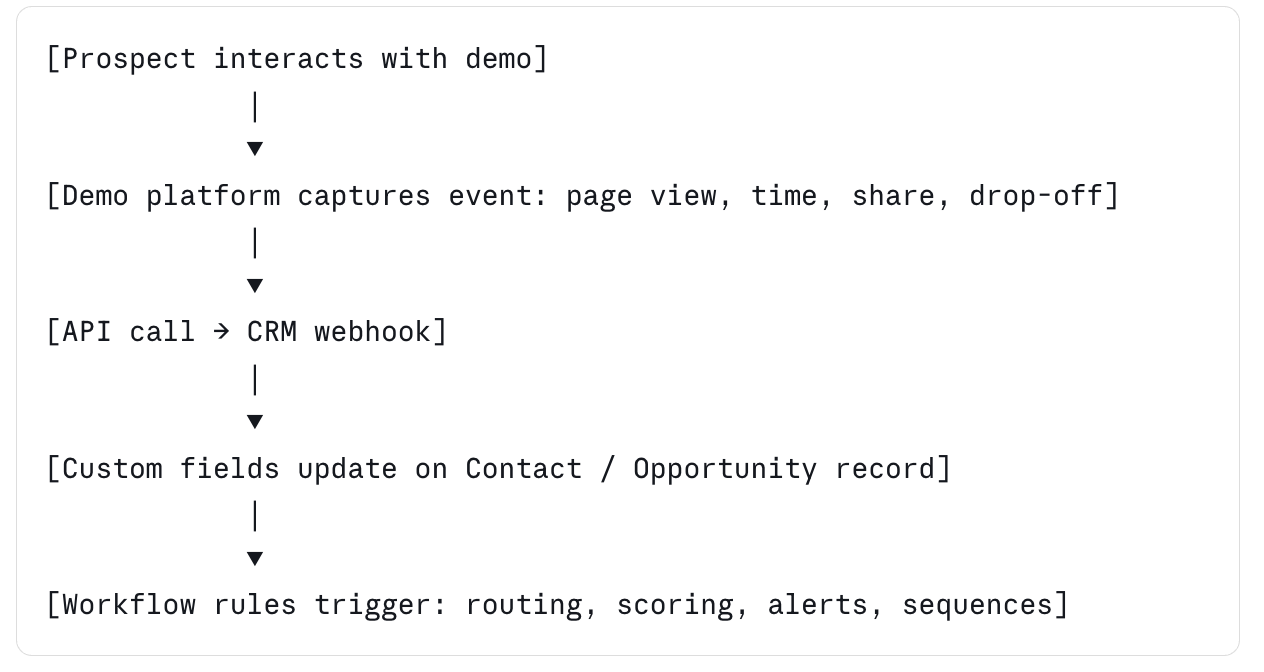
Here’s what a typical field mapping looks like in production:
- Demo completion percentage → Custom Field “Buyer Engagement Score”
- Pages viewed in demo → Custom Field “Demo Pages Engaged”
- Time on highest-value page → Custom Field “Pricing Interest Signal”
- Demo shared with another contact → Custom Field “Stakeholder Expansion”
- Drop-off page → Custom Field “Last Feature Viewed”
These fields plug into existing scoring models, lifecycle stages, and routing rules. A demo that hits 85% completion and gets shared with a new contact triggers a different workflow than one that drops off at the second page.
This is where Walnut’s AI suite earns its keep. InsightsAI auto-analyzes demo engagement patterns and pushes the most actionable signals (which features got the most attention, where prospects dropped off, who else viewed the demo) directly to the deal owner inside Salesforce or HubSpot. Reps don’t have to dig through a separate analytics dashboard. Across the broader product suite (AI Mode for conversational demo creation, EditsAI for persona adaptation, InsightsAI for engagement analytics, and StoryCapture for automated demo assembly), the integration layer does the same job: turn demo behavior into a signal your CRM can act on without rep input.
5 Sales Workflows You Can Run When Demo Data Flows Into Your CRM
Once the integration is live, the workflows compound fast. Here are the five that move the needle.
1. Auto-Route Based on Demo Drop-Off
If a prospect skips features tied to a specific use case (say, the integrations tab when they’re evaluating you for an integration-heavy workflow), that’s a flag. Set a workflow that automatically notifies your sales engineer and assigns a follow-up task to address the missed feature.
This catches deals where prospects didn’t see the part of the product that matters most to them. Without the integration, that signal is invisible until the call where someone says “we didn’t realize you did that.” By then, the deal might already be in a competitive evaluation.
2. Trigger Follow-Up Sequences by Completion Percentage
Demo completion percentage is one of the cleanest intent signals in B2B sales. Set thresholds in HubSpot or Salesforce that trigger different follow-up sequences:
- 0 to 25% completion: re-engagement nurture sequence
- 25 to 75% completion: standard rep outreach
- 75%+ completion: priority follow-up within 24 hours
This automates what reps do manually and inconsistently. It also makes pipeline reviews faster because completion percentage shows up next to every open opportunity, giving managers an instant read on which deals deserve attention this week.
3. Surface Stakeholder Expansion Automatically
When a prospect shares your demo with a new email address, that’s a buying committee signal. Set a workflow that creates a new contact record, ties it to the existing opportunity, and notifies the rep within minutes.
Most B2B deals stall because the original champion can’t sell internally. Catching new stakeholders the moment they engage gives reps a window to multi-thread before the deal goes cold. This is one of the highest-impact workflows in the entire stack and ties directly to broader buyer engagement signals teams already track.
4. Score Accounts by Aggregated Demo Activity
For ABM motions, roll up demo engagement at the account level. If three different contacts at the same target account watched the same product flow within a two-week window, the account score should reflect that.
Tools like Clari and 6sense plug into this directly. Demo engagement becomes one of the inputs that determines which accounts get prioritized for the next outbound sprint, replacing the gut-feel call with a behavioral signal.
5. Trigger Loss Reason Analysis on Stalled Deals
When a deal sits in the same stage for too long, pull the demo engagement history into the loss reason analysis. If the prospect never made it past the second page of the demo, that’s a different problem than a deal where they viewed every feature and still went silent.
This separates “didn’t see the value” from “saw the value, decided against it.” Two completely different problems with two completely different fixes. RevOps teams that segment lost deals this way build a sharper feedback loop into product marketing and sales enablement.
What to Get Right Before You Turn the Integration On
The integration itself is the easy part. The hard part is making sure it produces signal your team will actually use. Three setup decisions matter more than the rest.
Field Mapping Discipline
Don’t push every demo event into the CRM. Pick the four or five fields that map directly to existing scoring or routing logic. Demo completion percentage, top feature engaged, drop-off page, sharing activity, and last-active timestamp cover most use cases. Adding more fields than that creates noise and dilutes the signal reps actually need.
The cleanest setups start with one custom field tied to one workflow, then add fields incrementally as the team proves out the value. Trying to build a full engagement model on day one usually ends with abandoned dashboards and skeptical reps.
Stakeholder Alignment Between RevOps and Marketing
Demo + CRM integration sits between two teams that don’t always share goals. Marketing owns the demo platform. RevOps owns the CRM schema. If they don’t align on field naming, scoring weights, and trigger definitions before launch, the integration produces conflicting reporting.
The fix is to make integration ownership explicit. One person on RevOps and one person on marketing or sales engineering should sign off on every new field, every new workflow, and every change to scoring logic. That sounds heavy. It’s not. It saves months of cleanup later.
Data Hygiene at the Demo Level
Bad demo data produces bad CRM signal. If your demos are inconsistent across reps (different versions, different feature emphasis, different lengths), the engagement data won’t be comparable. A 60% completion on one demo means something completely different than 60% on another.
Standardize the demo templates first. Then turn on the CRM sync. Teams using demo automation to enforce template consistency see cleaner downstream data because every prospect is interacting with the same baseline experience.
Why Demo Data Fixes the “Attribution Black Hole” in Your CRM
Most CRM attribution stops at meeting attended. Pipeline forecasts pull from stage progression, deal age, and last activity date. None of that captures whether the buyer actually engaged with the product.
This is the attribution black hole. There’s a long gap between “meeting attended” and “proposal sent” where buyer intent is invisible to the system of record. Reps fill the gap with subjective notes (“call went well”) that don’t roll up into pipeline reporting and don’t help forecasting.
Demo engagement closes that gap. When a prospect’s interaction with the product becomes a tracked field on the deal record, you can finally measure intent between meetings. Forecasts get more accurate because they include behavioral data, not just stage age.
Gartner found that 64% of sales organizations modify their sales strategy two or more times per year (Gartner, The Future of Sales 2030). That much strategic churn requires better signal. Teams that route deals by demo intent see meaningfully shorter sales cycles, with internal customer benchmarks pointing to roughly 34% faster cycle time for deals where demo engagement signals fed directly into rep follow-up logic. The exact lift varies by motion, segment, and rep behavior, but the directional pattern holds across multiple teams running this workflow.
The bigger point is structural. RevOps teams have spent a decade trying to plug intent data into pipeline reporting. Demo engagement is the cleanest version of that signal because the prospect is interacting with your actual product, not your marketing site or your competitors’ content. The intent is unambiguous and tied to real evaluation behavior.
Metrics That Actually Move Pipeline
If you’re going to instrument demo + CRM integration, instrument the right things. Three metrics are worth tracking weekly.
Measure this: Demo completion rate → pipeline velocity. Track average completion percentage by deal stage. Deals with higher completion percentages should move through stages faster. If they don’t, your stage definitions probably don’t match how buyers actually evaluate. This metric also flags reps who push deals forward without clear engagement, which is a common forecasting risk.
Measure this: Feature engagement patterns → deal expansion opportunity. Look at which features prospects spend the most time on inside the demo. Heavy engagement on premium-tier features signals expansion potential before the deal even closes. Pipe this signal into post-sale handoff so CSMs are aware on day one of the renewal cycle.
Measure this: Stakeholder expansion rate → deal velocity. Track how often demos get shared internally and how that correlates with close rate. Deals where demos hit three or more contacts at the same account close faster, more often, and at higher contract value. This is one of the most predictive signals in B2B sales and almost no team measures it consistently.
For deeper analysis, Walnut’s demo analytics breaks these patterns down by persona, feature, and account. The point isn’t more dashboards. It’s getting the right signal in front of the right rep at the right moment.
Key Takeaways
- Demo + CRM integration pushes engagement data (completion %, feature views, sharing activity) into Salesforce, HubSpot, or Clari in real time, replacing manual rep logging.
- Field mapping turns demo behavior into actionable CRM signals (e.g., “Demo Completion %” → Buyer Engagement Score) that drive routing, scoring, and follow-up workflows.
- Five high-impact workflows include auto-routing by drop-off, triggering follow-ups by completion percentage, capturing stakeholder expansion, account-level scoring for ABM, and loss-reason analysis on stalled deals.
- Demo engagement closes the attribution black hole between “meeting attended” and “proposal sent,” giving RevOps a behavioral signal that improves forecast accuracy.
- The three metrics worth tracking weekly are demo completion rate by stage, feature engagement patterns by persona, and stakeholder expansion rate at the account level.
FAQ
How does demo data flow into Salesforce or HubSpot?
Demo platforms connect through native CRM apps or webhooks. When a prospect interacts with a demo, the platform fires API calls that update custom fields (like demo completion percentage, pages viewed, or features explored) on the contact or opportunity record in real time. From there, you can build workflows, scoring rules, and reports just like you would with any other CRM field. Most modern demo platforms ship with prebuilt Salesforce and HubSpot connectors, so the setup takes hours, not weeks.
What’s the difference between demo analytics and CRM-integrated demo data?
Demo analytics live inside the demo platform. CRM-integrated demo data lives in Salesforce, HubSpot, or Clari, which is where reps already work. The underlying signal is the same. The difference is whether reps have to leave their CRM to act on it. Integration matters because reps don’t switch tools to chase a single signal, no matter how good the dashboard looks.
Can I trigger sales workflows based on demo engagement?
Yes. Once demo data populates CRM fields, you can build any workflow that triggers off those fields. Common examples include notifying the sales engineer when a prospect skips an integration page, routing hot leads to a senior rep when completion percentage hits 75%, or firing a Slack alert when a demo gets shared with a new stakeholder. The CRM already knows how to fire workflows. Demo data just gives it new triggers.
What is a buyer engagement score and how is it calculated?
A buyer engagement score is a custom CRM field that aggregates demo activity into a single number. It typically weights factors like completion percentage, time spent on high-value pages, sharing activity, and revisit frequency. Most teams customize the formula based on what historically correlates with closed-won deals. The score then feeds into lead routing, prioritization, and forecast confidence rules.
Does this work with HubSpot, Salesforce, and Clari at the same time?
Most modern demo platforms push data to multiple CRMs and revenue tools simultaneously. The integration logic sits in the demo platform, so a single demo engagement event can update both Salesforce and Clari without manual configuration. For multi-system stacks, the demo platform becomes a single source of truth for demo signal, which is cleaner than syncing the same data between systems.
How do I measure ROI on a demo + CRM integration?
The cleanest ROI measure is sales cycle velocity. Compare time-to-close for deals that used the integrated workflow versus deals that didn’t. Secondary metrics worth tracking include forecast accuracy by stage, win rate by demo completion percentage, and rep time saved on manual logging. Most teams see directional results inside one quarter and can attribute meaningful pipeline lift inside two.
Why does demo engagement predict deal velocity better than meeting attendance?
Meeting attendance only confirms a calendar event. Demo engagement confirms actual product evaluation behavior, including which features the buyer cared about, how long they spent on each, and who else they pulled into the evaluation. That’s a far richer signal than a 30-minute meeting block on a Tuesday. Behavioral data consistently outperforms attendance data in pipeline forecasting models.
Ready to see what personalized demos can do for your pipeline? Start for free with Walnut.