Key takeaways
- Interactive demo ROI is the value your demos create, minus what they cost, divided by what they cost: (value created minus total cost) divided by total cost, times 100.
- Value comes from three places: time your sales engineers and reps get back, extra pipeline and wins on deals where buyers engaged with demos, and higher conversion on marketing demos.
- Count the full cost, including the people time to build and maintain demos, not just the software license.
- Measure lift by comparing deals with demo engagement to deals without it, instead of crediting demos with every deal they touched.
- Pipeline attribution only works when demo sessions are tied to known contacts and synced to opportunities in your CRM.
- The metrics that matter change by funnel stage: engagement and completion early, pipeline influence and win rate later, and SE hours saved across the whole cycle.
Every revenue team that runs interactive demos (clickable, self-guided product walkthroughs) eventually gets the same question at budget time: what are these actually worth? Session counts and view totals do not answer it. A CFO wants to know what changed in pipeline, win rate and team capacity because the demos exist.
Most teams cannot answer that cleanly, and not because the value is missing. The data sits in two places that never meet: engagement in the demo platform and revenue in the CRM. Until those are connected, demo ROI stays a guess.
This guide gives you a working formula for interactive demo ROI, a worked example you can copy, the metrics that matter at each funnel stage, and a practical way to attribute pipeline without overclaiming.
What is interactive demo ROI?
Interactive demo ROI (return on investment) measures the business value your interactive demos generate compared with what they cost to run. It turns demo activity into the outcomes leadership already tracks: hours saved, pipeline created, deals won and cycles shortened.
It is different from demo engagement. Engagement tells you whether people watched. ROI tells you whether watching changed anything. A demo with 5,000 sessions and no measurable effect on pipeline has a lower return than a demo with 300 sessions that lifts win rate on late-stage deals.
How do you calculate interactive demo ROI?
Use the standard ROI formula, with demo-specific inputs on each side:
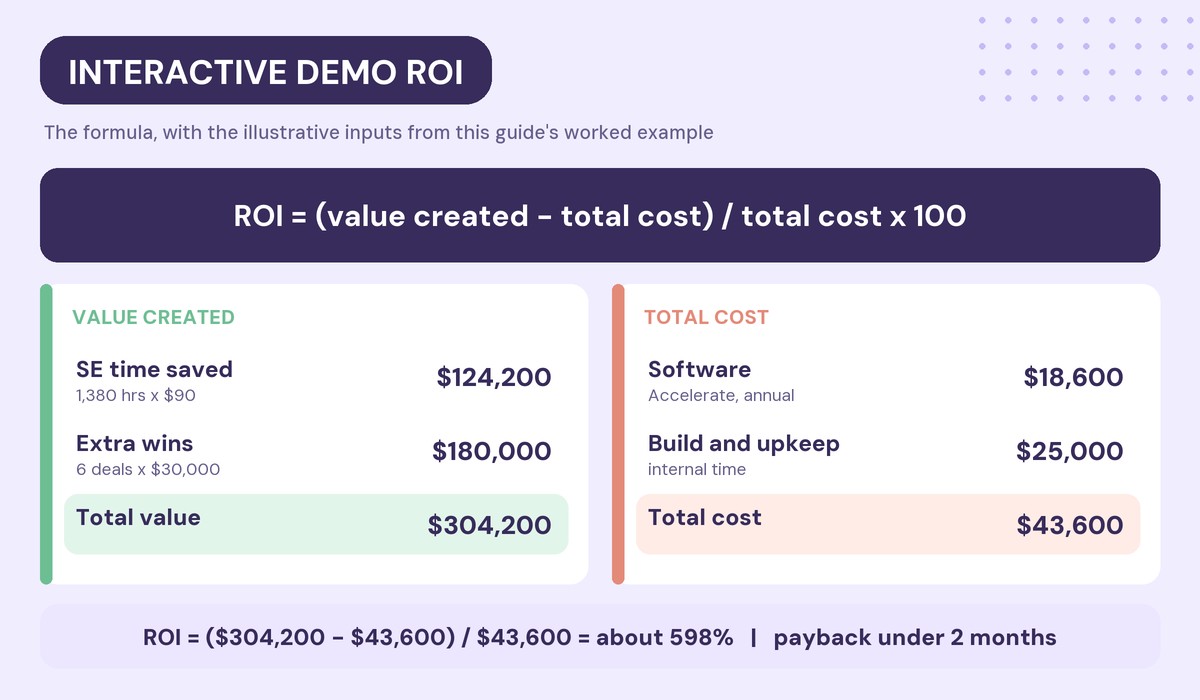
Interactive demo ROI = (value created minus total cost) / total cost × 100
The hard part is not the math. It is deciding what counts as value and making sure you count all of the cost.
The value side
Interactive demos typically create value in three ways:
- Time saved: hours your sales engineers (SEs) and reps no longer spend building, rebuilding or delivering repetitive demos. Multiply hours saved by a loaded hourly cost.
- Incremental wins: extra closed-won revenue on deals where buyers engaged with demos, measured as the difference in win rate between deals with and without demo engagement.
- Marketing conversion: more leads or meetings from demos on your website, in emails and in campaigns, valued at your normal pipeline value per lead.
Pick the ones you can measure today. A credible ROI built on two solid inputs beats an impressive one built on five guesses.
The cost side
Count every cost the program creates:
- Software: the demo platform license, billed monthly or annually.
- Build time: hours spent capturing, editing and personalizing demos.
- Maintenance time: hours spent updating demos when the product changes.
- Enablement: time spent training reps to use and share demos.
Teams that leave out people time end up with ROI figures that look inflated, and those numbers rarely survive a finance review.
A worked example: interactive demo ROI for a 10-person SE team
The numbers below are illustrative inputs, not benchmarks. Replace each one with your own data. The structure is what matters.
| Line item | Example inputs | Example value |
|---|---|---|
| SE time saved | 10 SEs x 3 hrs/week x 46 weeks x $90/hr | $124,200 |
| Incremental wins | 150 demo-engaged opps x (24% – 20%) x $30,000 | $180,000 |
| Total value created | $304,200 | |
| Software | Walnut Accelerate list price, billed annually | $18,600 |
| Build and maintenance time | Internal hours, estimated | $25,000 |
| Total cost | $43,600 | |
| ROI | ($304,200 – $43,600) / $43,600 x 100 | About 598% |
| Payback period | $43,600 / ($304,200 / 12 months) | Under 2 months |
Here is how the example works:
- Time saved: 10 SEs each save 3 hours a week on demo builds and repeat demos. Over 46 working weeks that is 1,380 hours. At a loaded cost of $90 an hour, that is $124,200.
- Incremental wins: 150 opportunities a year include demo engagement. If they win at 24% instead of the 20% baseline, that is 6 extra wins. At a $30,000 average deal, that is $180,000.
- Total value: $124,200 plus $180,000 equals $304,200.
- Total cost: $18,600 for software (the list price of Walnut’s Accelerate plan, billed annually) plus $25,000 of internal time to build and maintain demos equals $43,600.
- ROI: ($304,200 minus $43,600) divided by $43,600 equals about 598%.
- Payback: $43,600 of cost divided by about $25,350 of value per month is a payback period of under two months.
Notice where the value comes from. In this example, more than 40% comes from SE time alone, which you can measure in weeks. Win-rate lift takes longer to prove, so many teams lead with time saved and add pipeline impact as the data matures.
Which metrics matter at each funnel stage?
No single metric captures demo ROI. Track a small set at each stage, and connect them to the value inputs above.
Top of funnel: is anyone engaging?
- Sessions: how many times demos were opened, including repeat visits.
- Unique viewers: how many individuals engaged.
- Bounce rate: the share of sessions that left after the first screen without interacting. A high bounce rate usually means a weak opening screen or a gate that comes too early.
These are leading indicators. They do not prove ROI, but if they are weak, nothing downstream will be strong.
Mid-funnel: did viewers get the story?
- Completion rate: the share of demo screens viewed in a session.
- Guide completion rate: the share of guide chapters completed.
- Median time spent: how long a typical session lasts, which is less distorted by outliers than an average.
- CTA conversion: the share of sessions where the viewer clicked the call to action, such as booking a meeting.
CTA conversion is where marketing value shows up first. Each click is a lead or meeting you can value.
Pipeline: did demos touch real opportunities?
- Identified sessions: the share of sessions tied to a known contact or company. Without identification, you cannot connect engagement to deals.
- Opportunities with demo engagement: how many open deals include at least one demo session.
- Stakeholders per deal: how many people from the same account viewed a demo. Multiple viewers usually mean the demo is being shared inside the buying committee.
Our guide to demo intent signals that predict deal close covers how to read these signals in more depth.
Deal stage: did demos change outcomes?
- Win rate with and without demo engagement.
- Stage conversion rate with and without demo views.
- Sales cycle length with and without demo engagement.
These are the metrics that feed incremental wins in the formula. For more on the link between personalized demos and win rate, see how personalized demos increase closed-won rates.
Team efficiency: what did demos save?
- SE hours per demo: time to build or prepare a demo, before and after.
- Demos delivered without an SE: how many demos reps or buyers ran on their own.
- Ramp time: how fast new reps can give a credible demo.
Efficiency gains are often the fastest part of ROI to prove, because you can measure them before a single deal closes. If cutting SE prep time is your main goal, our list of the best tools for sales engineers compares the options.
How do you attribute pipeline to interactive demos?
Attribution is where most demo ROI calculations fall apart. The fix is to get engagement data onto opportunities, then compare like with like.
Step 1: Identify viewers
Engagement can only be tied to a deal if you know who viewed. Use a mix of methods: email parameters on links you send, a lead form placed after the viewer has seen value, and company-level identification for anonymous traffic.
Walnut’s guidance is to delay gating until steps 3 to 5 of a demo and to aim for 70% to 80% identification coverage across your demos. For anonymous visitors, Walnut Uncover identifies the viewer’s company from their IP address and can sync it to Salesforce or HubSpot, though it will not identify every viewer.
Step 2: Sync engagement to the CRM
Demo data needs to live on the opportunity, not in a separate dashboard. In Salesforce, the Walnut app adds a Walnut Demo Activities list to each opportunity, with fields such as session count, time spent, days since the last demo play and the stage when the demo was played.
In HubSpot, Walnut writes engagement to the contact timeline, including completion rates, viewed screens and CTA clicks, and associates activity with the related deal when there is a clear match.
Step 3: Compare deals with and without demos
With engagement on opportunities, compare cohorts:
- Win rate for deals with demo engagement versus deals without.
- Stage conversion with demo views versus without.
- Average sales cycle with demo engagement versus without.
Walnut’s Salesforce package includes ready-made reports for these comparisons, including Walnut Demo Impact on Won/Lost Rate, Demo Impact on Stage Conversion Rate and Demo Impact on Sale Cycle Length.
Step 4: Avoid double counting
Do not credit demos with the full value of every deal they touched. Use the difference between cohorts, as in the worked example, and keep the comparison fair by matching segment, deal size and time period. A demo cohort full of enterprise deals compared with an SMB baseline will overstate the effect.
What do real teams report?
Published customer results give a sense of where the value tends to land:
- Time saved: at Odaseva, demo prep dropped from 1.5 hours to 3 minutes, and more than 50 sellers could demo on their own, compared with a presales team of 8 before. New reps could start demoing on their first day instead of after about two weeks.
- Reach: SailPoint, with 150 SEs and over 200 integrations to demo, saw a 75% increase in demo views in one quarter.
- Engagement: Semarchy recorded 15,000 minutes of engagement through Walnut in six to seven months.
- Speed: ColorTokens reports 10x faster demo delivery.
Notice that most published results are about time and reach. That matches the worked example: efficiency is the fastest part of demo ROI to prove, and pipeline impact builds on top of it. For conversion data across many teams, see our interactive demo conversion rates report.
How do you improve interactive demo ROI?
Once you are measuring, these moves raise the return fastest:
- Fix the opening screens. If bounce rate is high, rewrite the first screen and move gates later in the flow.
- Shorten the story. Use the screens funnel and guides funnel to find where viewers drop, and cut or merge those steps.
- Raise identification coverage. Add email parameters to every link reps send, and turn on company identification for website demos.
- Put engagement where reps work. Sync to the CRM and build a report of open opportunities with low demo engagement, so reps can act before a deal stalls.
- Cut build time. AI can now build and edit much of a demo from your live product. Our guide on how to create a product demo with AI walks through the steps.
- Ask your data in plain language. Walnut Insights tracks sessions, completion, bounce, guide completion, call-to-action button conversion and a 1 to 10 engagement score for each demo, and Insights AI answers questions such as which demo received the most plays in the past month, covering the last six months of data.
How do you present demo ROI to leadership?
Leadership does not need every metric. It needs a short story with numbers it can check. A one-page summary usually works best:
- Start with the result. State the ROI and payback period in the first line, along with the time window you measured.
- Show the inputs. List each value and cost line, where the number came from, and which ones are estimates. Finance trusts a model it can audit.
- Separate proven from expected. Put measured time savings and conversion gains in one column and projected win-rate lift in another, so nobody mistakes a forecast for a result.
- Show the trend. Compare this quarter with the last one. A rising identification rate or a falling build time shows the program is getting better, not just existing.
- End with the next lever. Name the one change you expect to raise ROI most next quarter, such as better identification or more demos delivered without an SE.
Keep the model in a shared spreadsheet so sales, marketing and finance all work from the same numbers.
What are the most common demo ROI mistakes?
- Reporting views as ROI. Sessions show reach, not return. Tie them to pipeline or time saved.
- Leaving out people cost. License-only ROI looks great until finance adds the build and maintenance hours back in.
- Crediting demos with every deal. Use with-versus-without comparisons, not total influenced revenue.
- Skipping identification. Anonymous sessions cannot be attributed. Low identification coverage caps your measurable ROI.
- Measuring once. Demo performance changes as your product and messaging change. Report on a stable 14 to 30 day window, and re-check the same metrics 7 to 14 days after each change.
Frequently asked questions
How do you calculate ROI for interactive demos?
Use (value created minus total cost) divided by total cost, times 100. Value usually includes SE and rep time saved, extra wins on deals with demo engagement, and marketing conversions. Cost includes the software license plus the internal time to build, maintain and enable demos.
What is a good ROI for interactive demos?
There is no universal benchmark, because ROI depends on deal size, team size and how demos are used. A useful test is payback period: if the value created covers the full cost within a few months, the program is easy to defend. Compare your own results quarter over quarter rather than against another company’s number.
How do I prove interactive demos influence pipeline?
Sync demo engagement to opportunities in your CRM, then compare win rate, stage conversion and sales cycle for deals with demo engagement against deals without. Match the cohorts by segment and deal size so the comparison is fair.
Which interactive demo metrics matter most?
Completion rate and CTA conversion show whether viewers got the story and took a next step. Opportunities with demo engagement, win rate with and without demos, and SE hours saved show business impact. Track a few from each group rather than every metric available.
How long does it take to see ROI from interactive demos?
Time savings show up within weeks, because you can measure SE prep time and demos delivered without an SE right away. Pipeline and win-rate impact usually takes at least one full sales cycle to measure with confidence.
Do I need a CRM integration to measure demo ROI?
For pipeline ROI, yes. Without demo engagement on the opportunity, you cannot compare deals with and without demos. You can still measure time saved and marketing conversion without a CRM integration.
Ready to turn demo engagement into pipeline you can measure? Start for free with Walnut.