Key takeaways
- An agentic demo is a product demo with an AI agent inside it that answers buyer questions, adapts to what the buyer wants to see, and hands off to a human when it should.
- Agentic demos are the next step after video, click-through tours and interactive demos: the buyer can ask, not just click.
- The main risks are wrong answers, off-brand answers and topics an AI should never handle alone, such as discounts, legal terms and security commitments.
- Good agentic demos answer only from approved content, block sensitive topics, say when they do not know, and escalate to a person.
- The seller’s payoff is a briefing on what each buyer asked and where they hesitated, synced to the CRM.
- Evaluate vendors on grounding, guardrails, handoff, CRM output and cost per conversation, not on how impressive the chat looks.
An agentic demo is an interactive product demo with an AI agent built into it. The buyer can type or speak a question while looking at the product, and the agent answers in context, shows the relevant part of the product, and brings in a human when the question goes beyond what it should handle. Where an interactive demo lets a buyer click through a path you designed, an agentic demo lets the buyer ask for the path they need.
The timing is not an accident. 67% of B2B buyers now prefer a rep-free buying experience, according to a Gartner sales survey published in March 2026. Yet Gartner also found that 69% of buyers still turn to a sales rep to validate what AI tools tell them. Buyers want answers on their own schedule, and they still want a human to trust at the end.
Agentic demos sit exactly in that gap. This guide explains what they are, how they differ from interactive demos, where they work and where they go wrong, and how to evaluate a vendor before you put an AI agent in front of your buyers.
What is an agentic demo?
An agentic demo combines two things: a working version of your product, and an AI agent that can talk about it. The product part is usually an interactive demo (a clickable, self-guided product walkthrough captured from your real application). The agent part is a chat or voice assistant that understands which screen the buyer is on and what that screen is meant to show.
The word “agentic” matters. A plain chatbot answers questions from a knowledge base. An agent in a demo can also act: point the buyer to the right screen, adapt the order of the story, ask discovery questions, capture contact details and route the buyer to a person. It works on the buyer’s behalf inside the product experience, not next to it.
Done well, an agentic demo behaves like a patient sales engineer who is available at any hour, never improvises on pricing, and writes up every conversation for the account team. Buyers are already getting used to this: many now meet an AI demo agent before they meet your rep.
How agentic demos compare to other demo formats
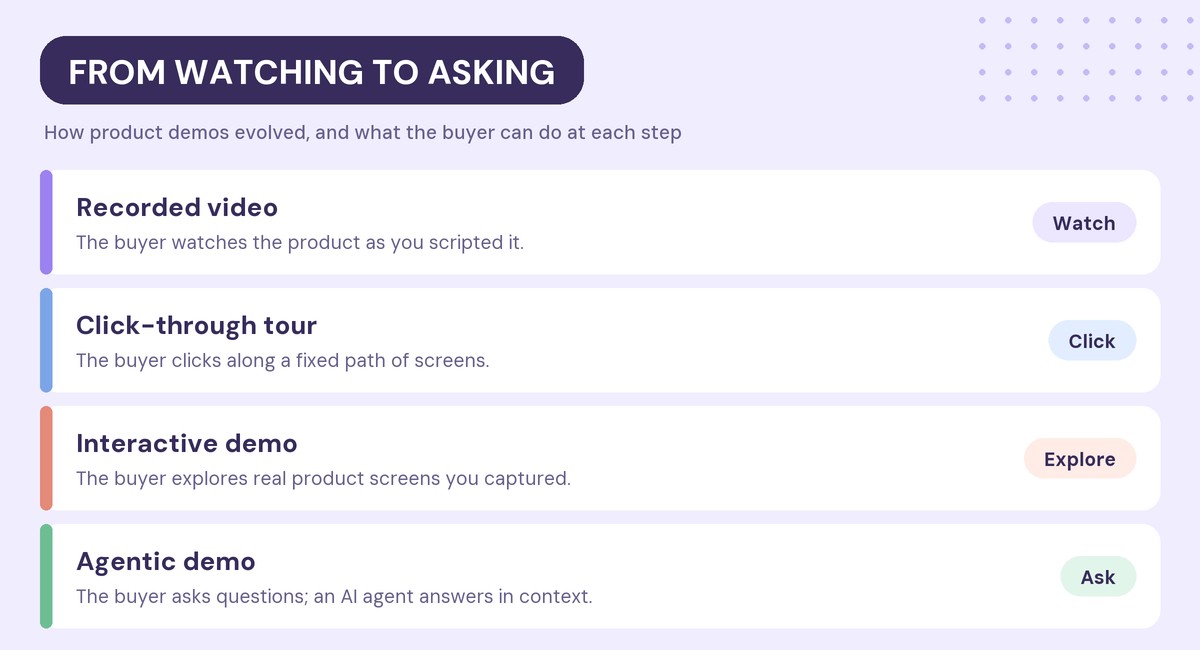
Product demos have moved along a clear spectrum over the last decade. Each step gave the buyer more control.
Recorded video demos
A video shows the product exactly as you scripted it. It is easy to produce and easy to share, but the buyer can only watch. If their question is not in the video, they wait for a call.
Click-through product tours
A click-through tour is a series of screenshots or screens with hotspots. The buyer clicks to move forward along a fixed path. Tours are quick to build and work well on websites, but they show a narrow slice of the product.
Interactive demos
An interactive demo is captured from your real product, so the buyer can click through realistic screens, often with guided steps and branching paths. Interactive demos give buyers hands-on experience without a sandbox or login. The limitation is that the buyer can only explore paths someone built in advance.
Agentic demos
An agentic demo adds an AI agent to the interactive demo. The buyer can ask “Can I break this down by region?” or “How does this connect to Salesforce?” and get an answer grounded in your content, on the screen where the question came up. The agent can also qualify the buyer and hand them to a rep.
Agentic vs. interactive demos: what’s the difference?
The difference is who drives. In an interactive demo, you design the path and the buyer follows it. In an agentic demo, the buyer asks for what they need and the agent responds.
| Interactive demo | Agentic demo | |
|---|---|---|
| Who drives | You design the path; the buyer follows it | The buyer asks; the agent responds |
| Buyer questions | Answered only if a step covers them | Answered in context, from approved content |
| Path through the product | Fixed or branching, built in advance | Adapts to what the buyer asks for |
| Handoff to sales | Forms and CTAs | Agent qualifies and routes to a person |
| What sellers learn | Clicks, views and time spent | Clicks plus the buyer’s own questions |
| Setup effort | Build the demo story | Build the story, then add content and guardrails |
That does not make interactive demos obsolete. An agentic demo is built on top of an interactive demo. If the underlying demo is weak, adding an agent only lets buyers ask questions about a weak demo. Get the core story right first, then add the agent.
When should you use an agentic demo?
Agentic demos earn their place where buyers have questions and no one is available to answer them. Four situations stand out.
After hours and across time zones
International buyers and late-night evaluators often reach your demo when your team is offline. An agent answers product questions immediately and books the follow-up, so the evaluation does not stall until morning.
Stakeholders who missed the call
Most buying committees include people who never join a demo call: finance, security, IT and end users. A leave-behind demo with an agent inside lets them ask their own questions instead of forwarding them to the champion.
Website demos for high-intent visitors
Visitors who open a demo on your website are researching, and many will not fill out a form to ask a question. An agent can answer, qualify and route them while their interest is highest.
Technical questions before the SE call
Buyers often want to check integrations, permissions or data handling before they commit time to a live session. An agent that answers from your documentation shortens that loop and lets your sales engineers spend calls on the hard questions.
When to wait
Agentic demos are a poor fit if your documentation is thin or out of date, because the agent can only be as good as the content it answers from. They also need extra care in regulated industries, where every product claim has to be approved. In those cases, fix the content first.
What can go wrong with agentic demos?
Putting an AI in front of buyers creates real risks. Buyers will ask hard questions, and some will try to break the agent. The common failure modes are predictable.
- Made-up answers. A general-purpose model will confidently describe features you do not have if it is allowed to fill gaps from its own knowledge.
- Off-brand answers. An agent can be accurate but sound nothing like your company, or overshare competitive positioning you meant for internal use.
- Commitments it should never make. Discounts, contract terms, roadmap dates, legal questions and security guarantees are decisions for people, not agents.
- Dead ends. An agent that cannot answer and offers no next step leaves a high-intent buyer with nowhere to go.
- Stale knowledge. If the product ships and the agent’s content does not change, answers drift out of date.
None of these are reasons to avoid agentic demos. They are reasons to choose a tool with strong guardrails.
Guardrails every agentic demo needs
The best agentic demos are designed around control first and autonomy second. Before you launch, make sure you can do each of these.
- Answer only from approved content. The agent should answer from sources you supply, such as documentation, pricing pages, integration guides, FAQs and the demo itself, and not from general model knowledge.
- Block topics. You should be able to name topics the agent will not discuss, such as discounting, and route them to a person.
- Say “I don’t know.” When the answer is not in the approved content, the agent should say so and offer a fallback, not guess.
- Escalate. Every conversation needs a way out to a human: book a meeting, send an email or bring in a rep.
- Match your voice. Name, tone and appearance should be configurable so the agent sounds like your team.
- Stay current. The agent’s knowledge should update when the product and the content change.
What do sellers get back from an agentic demo?
The overlooked value of an agentic demo is what it tells the seller. Every question a buyer types is a signal: what they care about, what they doubt and how far along they are.
A good agentic demo turns each session into a briefing for the account team. That briefing should include the questions asked, the topics the buyer probed, the points where they hesitated, and the full transcript, synced to the CRM so the rep sees it where they already work. It changes the next call from “So, what did you think?” to “You asked about regional reporting. Let me show you how that works for your team.”
Interactive demo engagement data already helps reps prioritize, as covered in our guide to interactive demo conversion rates. Agent conversations add the one thing click data cannot show: the buyer’s own words.
Example: how Walnut Buyer Xpert works
Walnut built its buyer agent around the guardrails above. Buyer Xpert sits inside a Walnut interactive demo and knows which screen the buyer is on, the current guide step and what that step is meant to show.
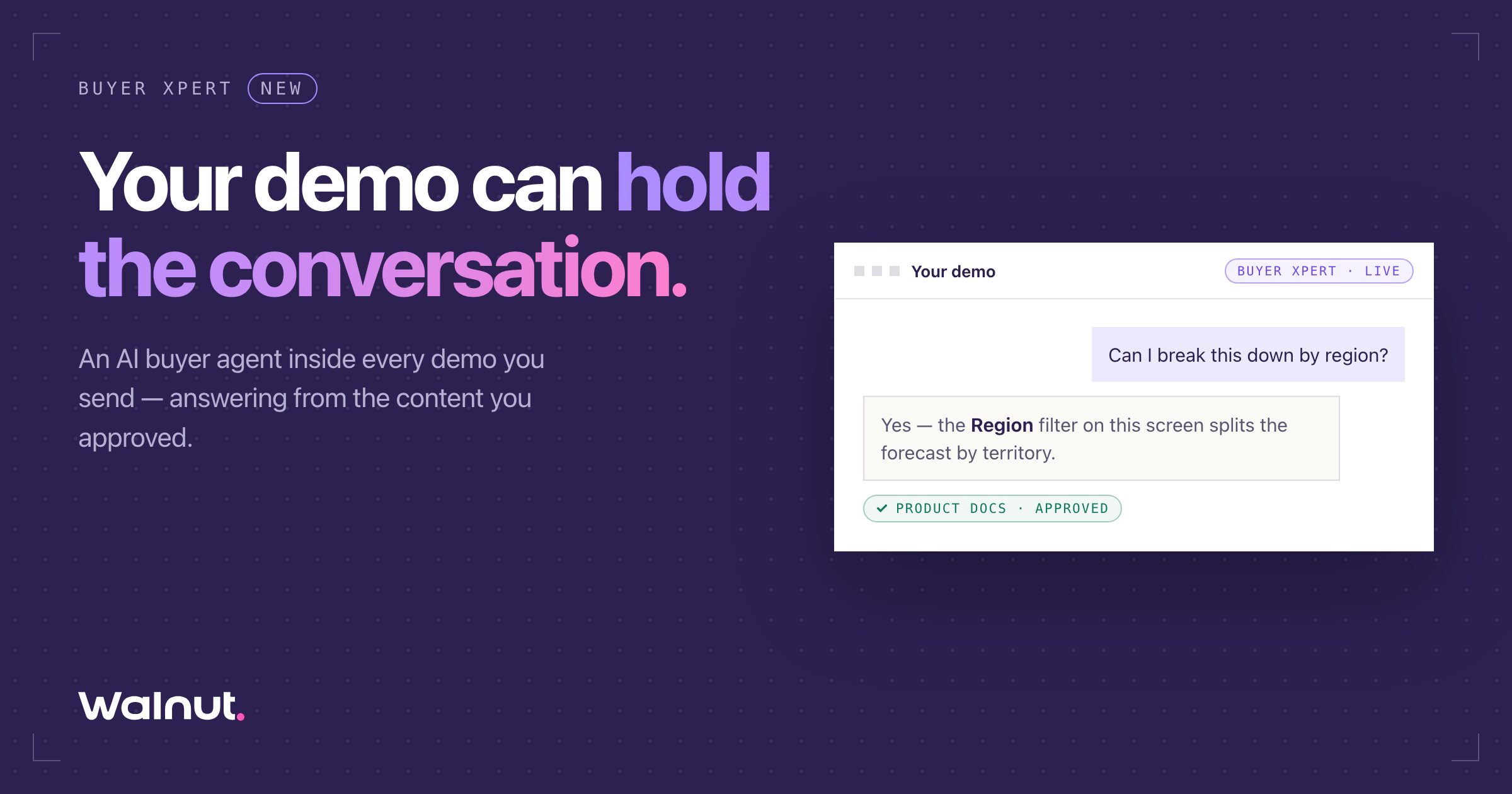
Here is how it works, based on Walnut’s product page:
- Buyers can type or speak their questions and hear answers read back.
- It answers only from approved content, such as documentation, pricing, integrations, FAQs, competitive responses and the demo itself, and not from general model knowledge.
- When it does not know, it says so, uses the fallback you configured and offers a next step, such as booking a meeting or bringing in a rep live.
- Admins name topics it will not discuss. Walnut’s example is discounting, which is routed to a person.
- Sellers get a session briefing with the questions asked, topics probed, points of hesitation and a suggested angle for the next conversation, synced to the CRM.
Buyer Xpert is included in every Walnut plan. An admin turns it on in the AI Center, then enables it per demo, and each answered buyer conversation uses one AI credit. It currently runs in interactive demos, with Playlists and Deal Rooms listed as next.
Walnut reports that sessions with its agent alongside a demo run more than double the time a buyer spends, according to its agent platform launch announcement. For the bigger picture on why buyers expect this, see the demo that talks back.
Other agentic demo tools in 2026
Several demo vendors now offer agents, and they take different approaches. Based on each vendor’s own site:
- Navattic Agents are conversational agents that guide and qualify prospects, answer questions and demonstrate workflows.
- Storylane RepX is a website agent that greets visitors, handles product questions and books qualified meetings.
- Consensus offers agent-led demos that tour the product, answer buyer questions and screen leads, feeding its Demo Intelligence analytics.
- Supademo’s AI Demo Agent answers from content you approve, surfaces relevant demos and supports conversations in 50+ languages.
The useful distinction is where the agent lives. Some agents sit on your website and steer visitors toward demos and meetings. Others sit inside the demo itself and answer questions about the screen in front of the buyer. Many teams need both, but they solve different problems. Our list of the best AI demo creation tools compares these vendors in more depth.
How to evaluate an agentic demo vendor
Agent demos are easy to make impressive in a sales call. Test them the way your buyers will: with real questions, awkward questions and questions the agent should refuse.
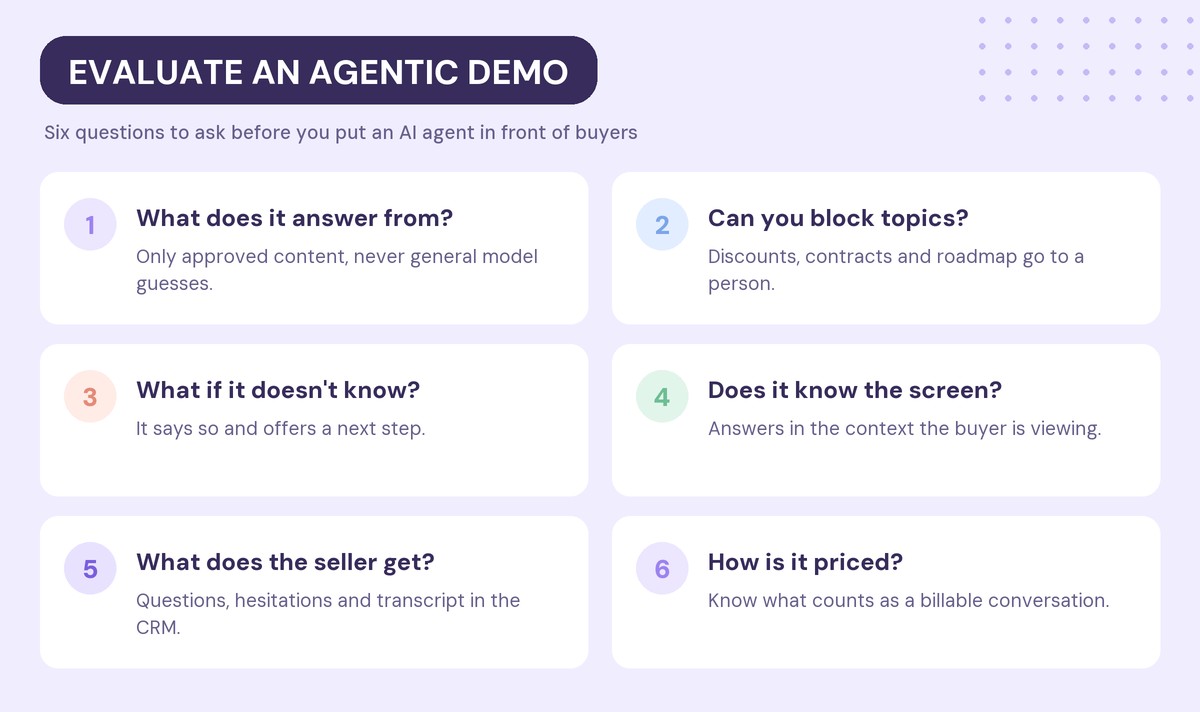
Six questions separate a safe agent from a risky one:
- What does it answer from? Ask exactly which sources the agent uses, and whether it can fall back on general model knowledge. “Only approved content” should be the answer.
- Can you block topics? Try asking for a discount, a contract change or a roadmap date. A good agent declines and routes the question to a person.
- What happens when it doesn’t know? Ask something that is not in your content. The agent should admit it and offer a next step, not guess.
- Does it know the screen? An agent inside the demo should answer in the context of what the buyer is looking at, not like a generic chatbot.
- What does the seller get? Look for a conversation briefing with questions, hesitations and transcript, synced to your CRM.
- How is it priced? Agent usage is often metered by conversation or credit. Ask what counts as a billable conversation and what happens when credits run out.
How to launch your first agentic demo
Start small and expand once you trust the answers.
- Pick one demo with a clear audience, such as your main website demo or the leave-behind for one segment.
- Clean up the source content the agent will answer from: product docs, integration guides, pricing and FAQs.
- Set the guardrails before anything else: blocked topics, fallback message and escalation path.
- Test it like a skeptical buyer. Have your SEs try to break it with edge cases and off-limits questions.
- Launch, then read the briefings weekly. The questions buyers ask will show you gaps in your content and your demo story.
Frequently asked questions
What is an agentic demo?
An agentic demo is an interactive product demo with an AI agent inside it. Buyers can ask questions by typing or speaking, and the agent answers in the context of the screen they are viewing, adapts what it shows, and hands off to a human when needed.
What is the difference between an agentic demo and an interactive demo?
An interactive demo lets buyers click through paths you designed in advance. An agentic demo adds an AI agent on top, so buyers can ask questions and get answers grounded in your approved content instead of being limited to the prebuilt path.
Are agentic demos safe to put in front of buyers?
They are safe when the agent answers only from approved content, blocks sensitive topics such as discounts and legal terms, admits when it does not know, and escalates to a person. Test those behaviors before launch.
Do agentic demos replace sales engineers?
No. Agentic demos handle routine product questions at any hour, so sales engineers can spend live time on complex evaluations. Buyers still want a person to validate decisions, and a good agent routes them to one.
How do agentic demos help sales teams?
They turn each buyer session into a briefing that shows what the buyer asked, which topics they probed and where they hesitated. Synced to the CRM, that briefing gives reps a better starting point for the next conversation.
How much do agentic demo tools cost?
Pricing varies by vendor. Many charge for agent usage by conversation or credit on top of a demo platform plan, so ask each vendor what counts as a billable conversation and what happens when credits run out.
Ready to put an agent inside your demos? Start for free with Walnut.