Buyer Xpert · New
Your demo can hold the conversation. Answered by AI, approved by you.
New from Walnut. Send a demo at 5pm. A buyer opens it at 11, asks three real questions, and gets real answers from your content. They reach the first call already convinced the product does what they need — and your reps spend their time on the ones ready to buy.
Trusted by Leading B2B Revenue Teams. Closing Deals 34% Faster


















Ask it something. Then ask something harder.
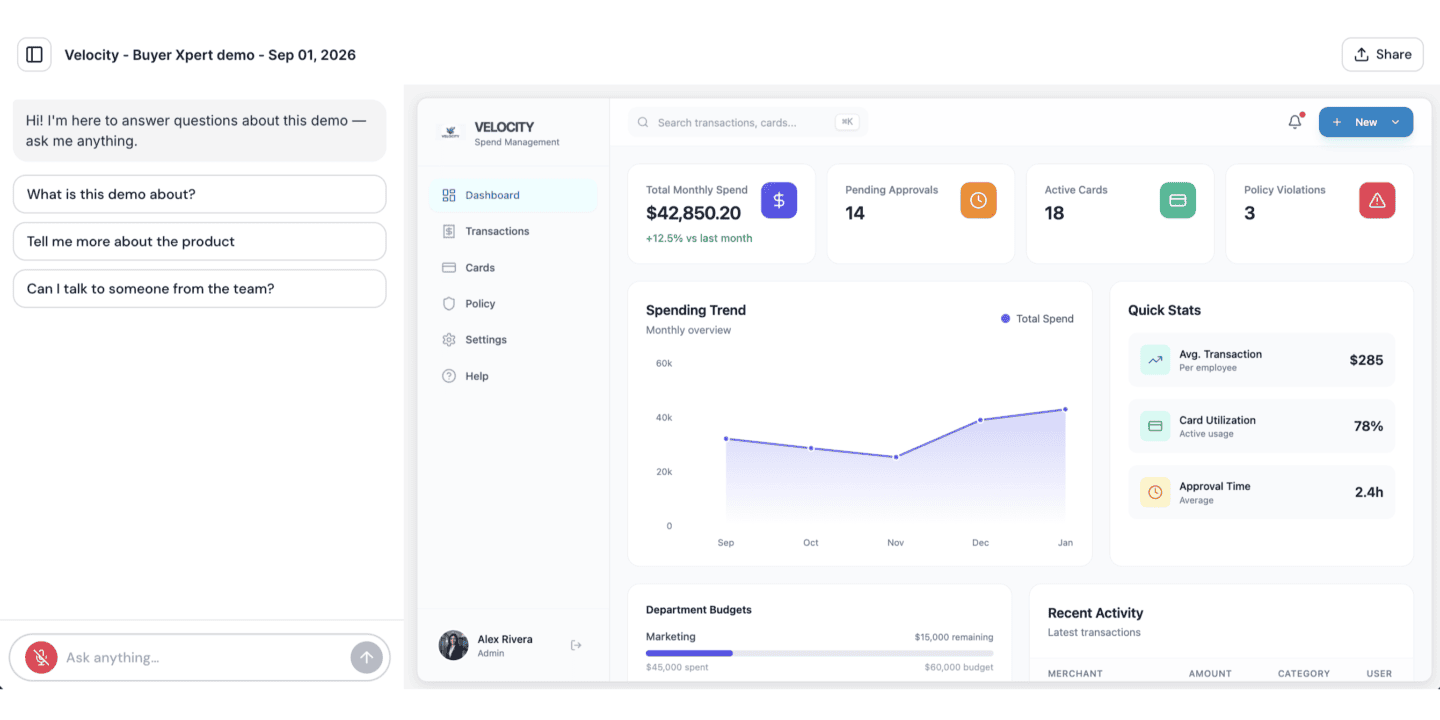
A real Walnut demo with Buyer Xpert running in it. Ask it anything about the product — pricing, integrations, security. See how far you get.
Buyers want to get further on their own. Right now your demo can’t take them there.
They have already decided to evaluate you without a rep in the room. The demand is not in question — what is missing is anything on the other end of it.
THE SILENT DROP-OFF
75%
of B2B buyers want a rep-free purchase experience. MCKINSEY
They have questions. Nobody is there.
So they leave, or they wait for a call. The one moment they were most interested is the moment you had nothing to give them.
THE INTELLIGENCE GAP
6–10
stakeholders per deal, and you never meet most of them. GARTNER
“Watched 4 screens” tells you nothing.
What did they care about? What did they ask? What stopped them booking a call? Engagement data cannot answer any of it.
THE OPENING
80%
of sales interactions now happen in digital channels. GARTNER
The demo is already where the deal happens.
It is the one place a buyer is fully engaged with your product. Give it a voice and it stops being a brochure and becomes the conversation.
CONTEXT-AWARE
The answer lands on the screen that raised the question.
It is embedded in the demo, not parked beside it, so it knows the screen the buyer is on, the guide step, and what that step was built to prove. Buyers can type or just talk to it. And because Walnut captures your live HTML, its answers stay right every time you ship.
GROUNDED
Every buyer gets your best answer.
Point it at your docs, pricing, integrations and competitive answers, and that is all it will ever say. Name the topics it must not touch and what it does instead. Change a message once and it reaches every demo you have ever sent — the same night.
SELLER INTELLIGENCE
Your reps know what the buyer wants before the first call.
“Noticed you were asking about our Salesforce integration” is a different email than “saw you checked out our demo.” Every conversation comes back as the questions asked, the topics probed and where they hesitated — in the session journey, synced to your CRM. And when a buyer wants a person, it brings one in while they are still in the demo.
Now write the follow-up email.
Better conversations, before anyone picks up the phone.
An informed buyer is a faster deal. That is the whole return on this, and it shows up in three different places.
FOR THE BUYER
They arrive already knowing the product.
Questions answered at the moment they were asked, not three days later on a call. Buyers get further on their own, and they get there believing it.
FOR YOUR REPS
Every lead arrives already qualified.
Every conversation says who was serious and what they wanted. Follow-ups open with the buyer’s own question, and first calls start at the second question instead of the first.
FOR LEADERSHIP
You finally see what buyers actually ask.
Not clicks — questions. Which features come up, which objections repeat, where deals hesitate. Demand data you could never read off a heat map.
Buy it, flip one toggle, and every demo can answer.
There is nothing to install, nothing to integrate and nothing to configure before it works. Add Buyer Xpert to your plan, switch it on for whichever demos you want, and it is live on them. That is the whole setup.
Request access to buyer Xpert
Six more things it does the moment it is on.
Everyone shipped an agent this year. Most of them wait outside your product.
Frequently asked questions
No — Buyer Xpert is a paid add-on on top of your existing plan, because each conversation carries a real model cost. An admin on your workspace can add it.
It is priced per plan on top of your existing contract, and metered by the conversations it answers. Tell us your workspace and demo volume and we will come back with your number.
In AI credits, which every plan already includes an annual allowance of. For Buyer Xpert the unit is one answered buyer conversation; greetings, one-word inputs and spam are filtered out and cost nothing. You can see consumption per feature in the AI Center.
AI pauses and the workspace owner is notified. There are no automatic overages and nothing is billed that you did not buy. You can top up with a credit pack at any time.
There is no setup. An admin adds the add-on, you toggle it on for whichever demos you want, and it is live on them — nothing to install, integrate or configure first.
Approved content only — your documentation, pricing, integrations, FAQs and competitive responses, plus the demo it is running in. It does not generate answers from general knowledge.
It does not guess. It says so, uses the fallback you configured, and offers the escalation CTA you set — book a meeting, email, or bring in a rep live while the buyer is still in the demo.
Yes. You set its name, tone and appearance, the topics it will not discuss, the fallback and the CTA. Updates propagate instantly to every demo it runs in.
Not yet. Buyer Xpert runs in interactive demos today. The same agent and the same guardrails extend to playlists and deal rooms next.
No. It answers the questions that would otherwise go unanswered, and hands your SDRs a structured briefing before every follow-up — what the buyer asked, what they kept returning to, and what to lead with.
Every demo you have already built can start answering this week.
Buyer Xpert is new, and it runs on the demos your team has already shipped. Nothing to rebuild, nothing to migrate — one toggle, and the next buyer who opens one gets an answer.