Key takeaways
- Buyer enablement platforms give B2B buyers what they need to make a decision on their own: product access, answers, proof and a shared plan.
- The 12 platforms in this guide fall into five types: interactive demo platforms, AI demo and presales platforms, deal rooms, value and business case tools, and enterprise content suites.
- Sales enablement equips your sellers. Buyer enablement equips the buying committee, including the people who never join a call.
- In 2026, the biggest shift is AI agents that answer buyer questions inside a demo or room, using only content the vendor has approved.
- Most teams need two capabilities working together: a way for buyers to see the product, and a shared space where the committee decides.
- Pick a platform by the moment where your deals stall, not by the longest feature list.
Buyers who get helpful information during a purchase are three times as likely to buy the bigger, more expensive option, with less regret, according to Gartner’s buyer enablement research. That one finding explains why buyer enablement has turned from a slide in a sales kickoff deck into a software category.
The problem is that most of what sellers send does not help. Decks describe the product without showing it. Call recordings run 45 minutes. The CFO, the security lead and the end users who decide the deal often never see the product at all, because they were not on the call.
Buyer enablement platforms close that gap. This guide compares 12 of them on what they are best for, what stands out, what they cost and where they fall short, so you can choose the right tool for the stage where your deals actually stall.
What is a buyer enablement platform?
A buyer enablement platform is software that helps B2B buyers research, evaluate and justify a purchase on their own terms. Instead of waiting for the next call, the buying committee can explore the product, get answers, share proof internally and follow a shared plan to a decision.
Buyer enablement platforms usually include some mix of four things:
- Product access: interactive demos (clickable, self-guided product walkthroughs) that let buyers see the product working.
- Answers: AI agents, FAQs and content that respond to buyer questions without a rep.
- Proof: ROI calculators, business cases, case studies and security documents a champion can share internally.
- Coordination: deal rooms and mutual action plans (shared checklists of steps, owners and dates) that keep the committee moving.
For a deeper look at the idea itself, see our guide to what buyer enablement is and why it matters.
Buyer enablement vs. sales enablement: what’s the difference?
Sales enablement equips your own team. It covers content management, training, coaching and playbooks, and its user is the seller.
Buyer enablement equips the people on the other side of the deal. Its user is the buyer, and its job is to make buying easier. The two overlap, which is why several enablement suites now sell buyer-facing rooms, but the test is simple: if the buyer never touches it, it is not buyer enablement.
The difference matters more in 2026 because the buyer is no longer only a person. Buying committees now ask AI assistants to research vendors before they talk to anyone. We cover what that means for sellers in your champion is now an AI agent.
How we evaluated these platforms
Every platform in this list was checked against the vendor’s own product and pricing pages in November 2026. We looked at five things:
- Product access: can buyers see and use the product without a live call?
- Self-serve answers: can buyers get questions answered without waiting for a rep?
- Committee reach: can a champion share the experience with stakeholders who were not on the call?
- Signals: does engagement data reach the seller and the CRM?
- Pricing transparency: is pricing published, and how does it scale?
Pricing and packaging change often. Treat the prices below as a starting point and confirm them with each vendor.
Buyer enablement platforms at a glance
| Tool | Best for | Standout | Starting price |
|---|---|---|---|
| Walnut | Buyers seeing and questioning the product | Buyer Xpert AI agent inside demos | $575/mo, billed annually |
| Consensus | Presales demo automation | Demolytics stakeholder insights | Contact sales |
| Navattic | Marketing-led website demos | Navattic Agents | Free plan; |
| Storylane | Published, tiered demo pricing | Hubs on Premium | Free plan; from $50/mo |
| Dock | One workspace from deal to onboarding | Rooms, portals and order forms | Free plan; $350/mo for 5 users |
| Aligned | Collaborative action plans | Stakeholder map | Free plan; from about $29/seat/mo |
| GetAccept | Journeys that end in a signature | Native e-signature | From $25/user/mo |
| trumpet | Fast, free-to-start microsites | Pods built from a prompt | Free plan; $45/user/mo |
| Zoomforth | Branded enterprise microsites | Security and accessibility controls | From $250/mo |
| Mediafly | Value selling | ROI and business case builders | Contact sales |
| Seismic (with Highspot) | Enterprises standardizing content | Governed content in rooms | Contact sales |
| Showpad | Content-heavy enablement teams | Shared Spaces on every plan | Quote-based |
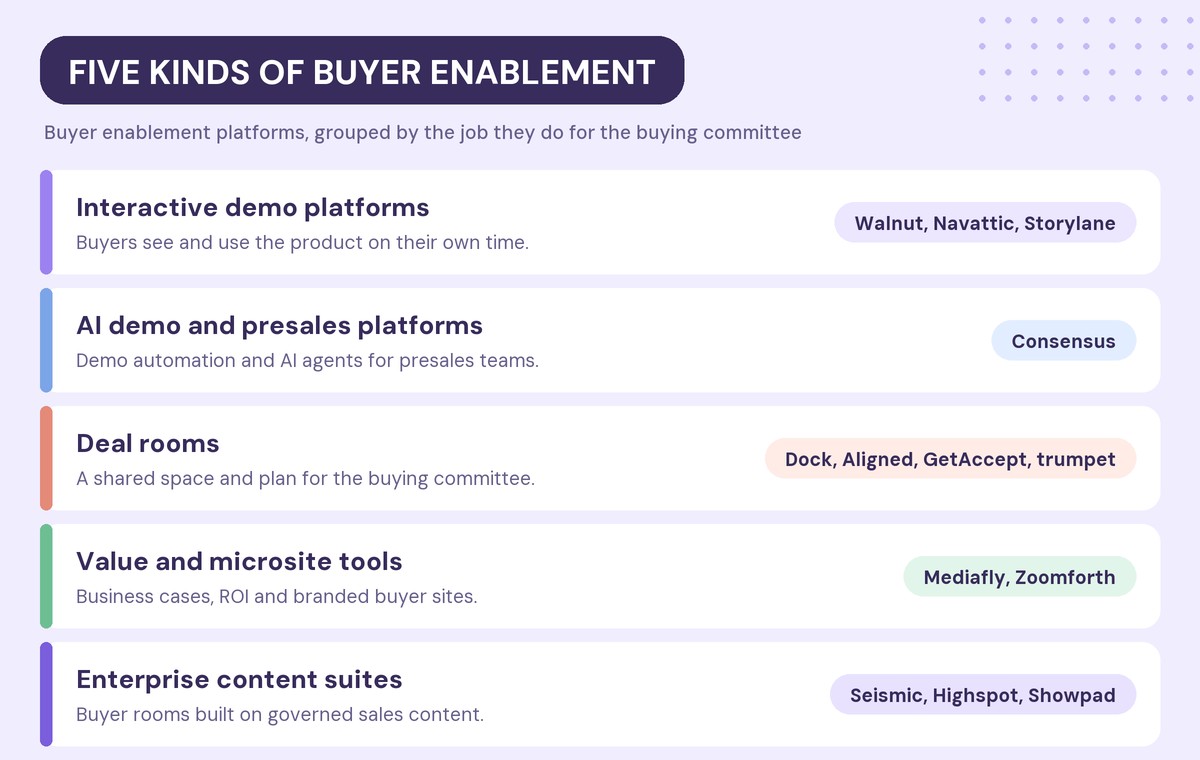
The 12 best buyer enablement platforms in 2026
1. Walnut: best for letting buyers see and question the product on their own
Walnut is an interactive demo platform built for B2B sales and marketing teams. Its starting point is that buyers trust what they can see working, so every buyer-facing surface is built around the product itself.
Teams capture their product once and turn it into personalized interactive demos. Those demos can be packaged into Playlists, shareable hubs of demos, files, videos and links, or placed inside Deal Rooms with a mutual action plan.
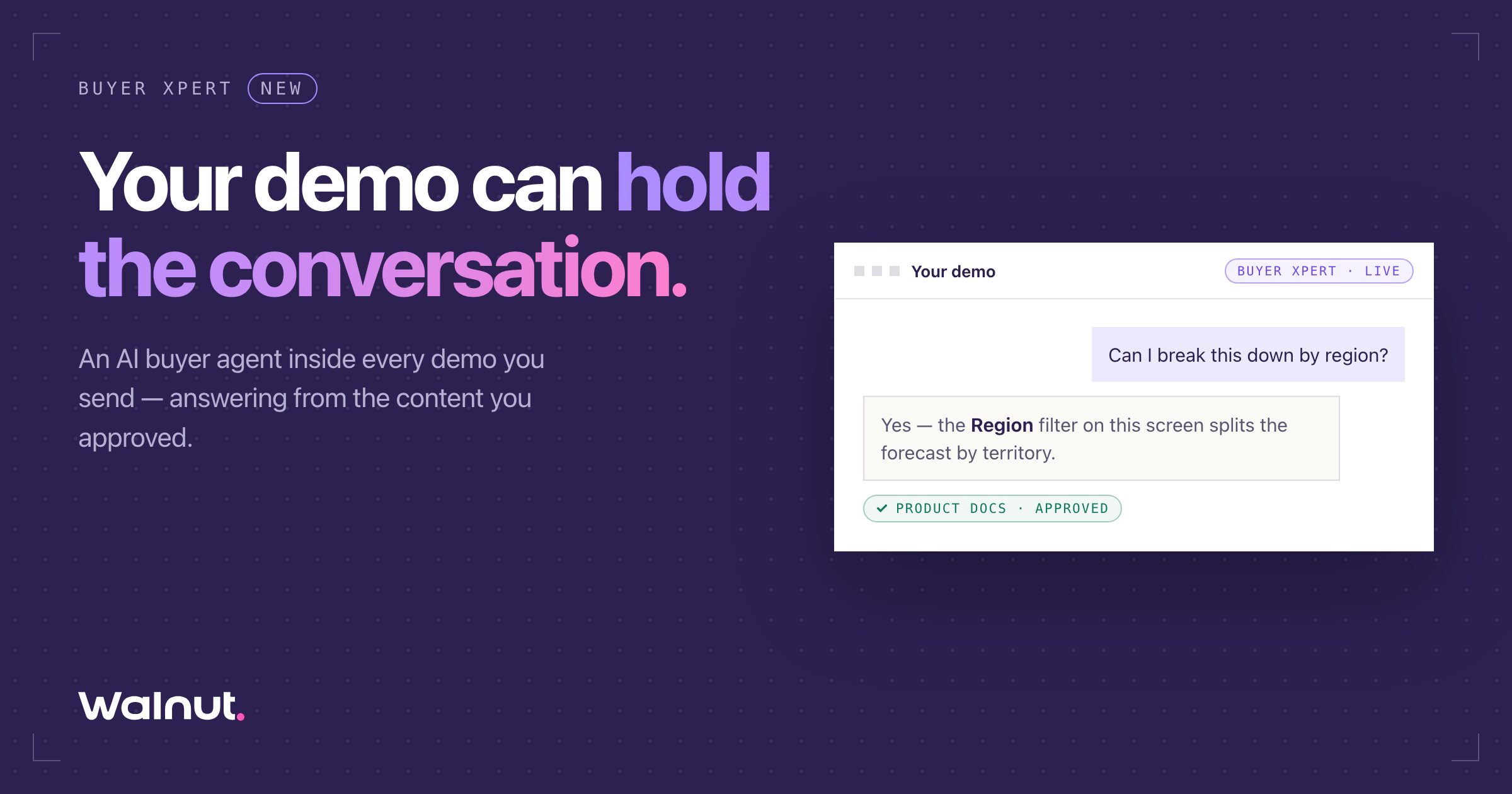
The newest layer is Buyer Xpert, an AI buyer agent that sits inside a demo and answers product questions on the screen the buyer is looking at. Key features include:
- Buyer Xpert answers only from approved content, such as documentation, pricing, integrations and FAQs, and says so when it does not know.
- Admins block topics, such as discounting, and route them to a human.
- Sellers get a session briefing synced to the CRM, with the questions asked, points of hesitation and a suggested angle for the next call.
- AI Mode builds and edits demos by chat, and on higher plans assembles a personalized Playlist or Deal Room from a single prompt.
- Engagement analytics show which accounts and stakeholders viewed what, with HubSpot and Salesforce integrations.
Pricing: the Ignite plan costs $575 per month, billed annually, and includes Playlists, Deal Rooms and Buyer Xpert. Accelerate costs $1,550 per month and adds InsightsAI and AI Mode for Playlists. Buyer Xpert uses one AI credit per answered conversation.
Trade-off: Walnut is built for teams that sell a product buyers need to see. Teams whose deals turn mainly on documents and signatures may not use the demo layer.
2. Consensus: best for presales teams automating discovery demos
Consensus is a demo automation platform aimed at presales and sales teams. It brings interactive product tours, AI demo agents, video demos and live demos into one platform.
- Interactive and on-demand video demos that buyers can share inside their company.
- AI demo agents for buyer-facing conversations.
- Demo Intelligence (Demolytics) for insights on which stakeholders engaged.
- Solutions for presales, sales, channel, marketing and customer success teams.
Pricing: no list price. Consensus prices by user license, plus optional usage-based capabilities.
Trade-off: there is no free plan or published pricing, so evaluation runs through sales.
3. Navattic: best for marketing-led interactive demos with AI agents
Navattic is an interactive demo platform popular with product marketing teams that run demos on their website.
- AI demo generation and editing through its Copilot.
- Navattic Agents, conversational agents that guide and qualify prospects, answer questions and show workflows.
- Account identification and pipeline impact on paid plans, plus buying circle discovery on Growth.
- Salesforce and Marketo integrations, with Gong, Salesloft and Outreach on Growth.
Pricing: a free Starter plan includes one seat.
Trade-off: Navattic’s center of gravity is website and marketing demos. Deal-stage tools such as mutual action plans are not part of the core product.
4. Storylane: best for demo builders who want published pricing
Storylane is an interactive demo platform with a broad free-to-enterprise ladder and Hubs, buyer-facing spaces for demos, PDFs, videos and embeds.
- Interactive demos with an Ask AI layer on paid plans.
- Hubs for grouping demos and content for a buyer.
- Account Reveal for identifying visiting companies, plus Deal Intelligence on Growth.
- Custom domains, SSO and SOC 2 on higher tiers.
Pricing: a free plan is available. Starter costs $50 per month, Growth $625 per month and Premium $1,500 per month, with about 20% off for yearly billing. Hubs start on Premium.
Trade-off: buyer hubs sit on the top tiers, so teams that need a room for every deal pay for the higher plan.
5. Dock: best for one workspace from deal to onboarding
Dock combines deal rooms, client portals, onboarding plans and order forms in one workspace, and it publishes clear pricing.
- AI-generated rooms with success criteria, next steps and phased timelines.
- Mutual action plans that carry over into onboarding.
- Order forms with signing status.
- Salesforce and HubSpot integrations.
Pricing: a free plan is available. Standard costs $350 per month for five users, and Premium costs $1,000 per month for ten users, billed annually. External buyers are free.
Trade-off: Dock organizes content well, but it does not let buyers use the product itself.
6. Aligned: best for collaborative mutual action plans
Aligned positions itself as an AI deal workspace for mid-market and enterprise sales and customer success teams.
- A stakeholder map and mutual action plan at the center of every room.
- One link with no buyer login required.
- A buyer-facing AI agent that answers questions in the room.
- Integrations with Salesforce, HubSpot, Gong and Slack.
Pricing: a free Starter plan covers up to four rooms per seat. Paid plans start at about $29 per seat per month, billed annually.
Trade-off: reviewers most often point to limited customization and design control.
7. GetAccept: best for buyer journeys that end in a signature
GetAccept started in e-signature and grew into a digital sales room platform, so the room and the contract live in one place.
- Native e-signature, including advanced and qualified signatures.
- Mutual action plans and stakeholder tracking.
- In-room chat, meetings and video.
- Engagement analytics across the buying committee.
Pricing: eSign starts at $25 per user per month, and Professional at $49 per user per month, with a five-user minimum on an annual agreement.
Trade-off: GetAccept is strongest late in the deal. It does less for buyers in the early research stage.
8. trumpet: best for fast, free-to-start buyer microsites
trumpet calls its rooms Pods and serves revenue teams from SDRs to customer success.
- An AI copilot that builds a Pod from a prompt.
- Mutual action plans and an AI engagement score.
- AI org charts for mapping the buying committee.
- 70+ integrations, with e-signature on higher tiers.
Pricing: a free plan includes ten Pods. Paid plans start at $45 per user per month.
Trade-off: reviewers mention limited CRM sync and a learning curve at the start.
9. Zoomforth: best for branded buyer microsites at enterprise scale
Zoomforth is an enterprise microsite platform used for proposals, client portals, RFP responses and account-based campaigns. It is popular with professional services firms.
- A no-code, drag-and-drop editor with templates and brand themes.
- Password protection, email authentication, MFA and SSO.
- Translation into any language and WCAG 2.1 AA accessibility.
- Analytics on visits, time on site and devices.
Pricing: from $250 per month, with a 14-day free trial.
Trade-off: Zoomforth is a general microsite builder. It has no product demos and no mutual action plan built for deals.
10. Mediafly: best for value selling and business cases
Mediafly focuses on helping sellers quantify value for buyers, which suits field teams in manufacturing, consumer goods, life sciences and technology.
- ROI calculators, TCO estimators and business case builders.
- Digital sales rooms with engagement tracking.
- Content management for field teams, dealers and distributors.
- Value realization tools for after the sale.
Pricing: contact sales.
Trade-off: the value tools are seller-led. Buyers see the output, but most of the work happens on the seller’s side.
11. Seismic (with Highspot): best for enterprises standardizing content
Seismic completed its acquisition of Highspot in 2026, so the two largest enablement suites now share a parent. Both offer digital sales rooms on top of their content platforms.
- Buyer-facing rooms built from governed, approved content.
- Engagement alerts and analytics for sellers.
- Mutual action plans and security controls such as passwords and domain restrictions.
- AI content generation and deal insights.
Pricing: contact sales.
Trade-off: buyer enablement is one module of a large internal enablement suite. It makes the most sense if you already run one of the two platforms.
12. Showpad: best for content-heavy enablement teams
Showpad’s buyer-facing rooms are called Shared Spaces, and they are included across Showpad’s plans.
- Mutual action plans with owners, due dates and notifications.
- Buyer uploads and meeting booking inside the space.
- An approved-content library and templates.
- Buyer analytics with a management dashboard.
Pricing: quote-based, per user.
Trade-off: like Seismic, Showpad is an enablement suite first, and pricing is not published.
How do you choose a buyer enablement platform?
Start with where your deals stall. If buyers go quiet after the first call, they probably need to see more of the product. If deals stall in procurement, they need proof and a plan. If they stall because the committee keeps growing, they need something a champion can share.
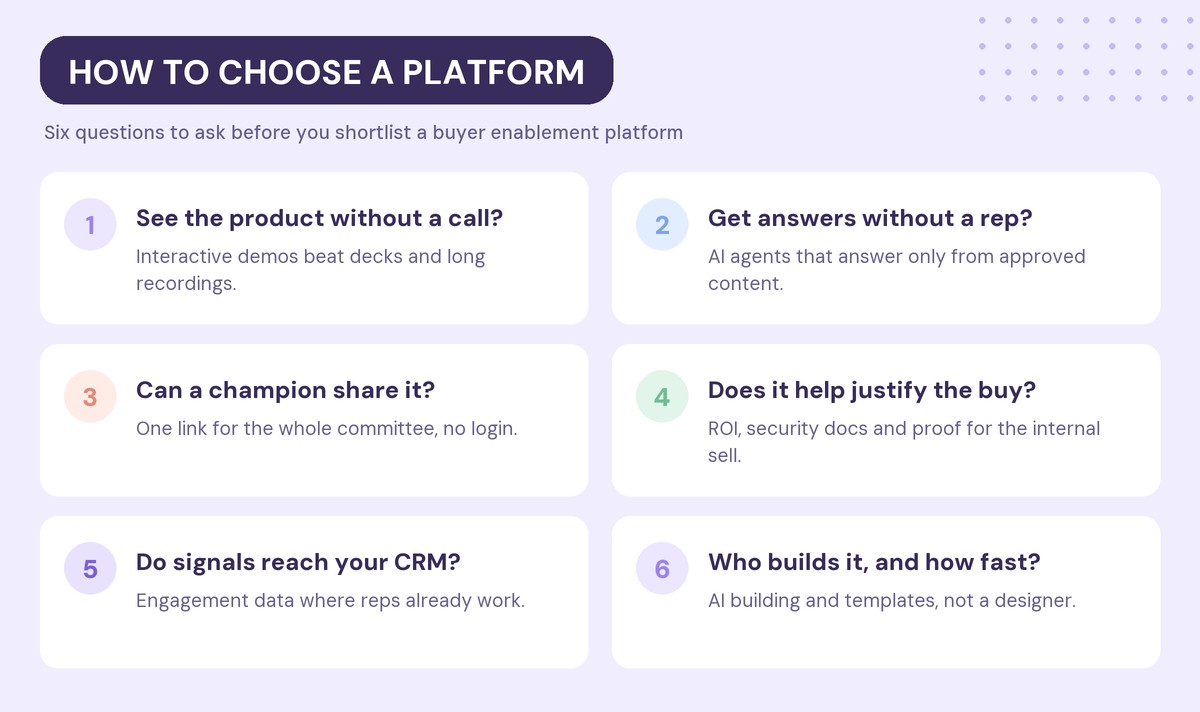
Six questions narrow most shortlists:
- Can buyers see the product without a call? Most buyers want to verify the product works before they commit time to a vendor. A leave-behind demo built for the people who missed the call does more than a recording.
- Can buyers get answers without a rep? AI buyer agents now handle routine product questions. Check what content the agent answers from and how it hands off to a human.
- Can a champion share it internally? The people who decide the deal often never meet you. Look for one link that works for the whole committee without a login.
- Does it help buyers justify the purchase? ROI tools, security documents and case studies give your champion the material to sell internally.
- Do signals reach your CRM? Engagement data only changes outcomes if the rep sees it where they already work.
- Who builds it, and how fast? If every room or demo needs a designer, it will not get used. AI building and templates matter more than design options.
How much do buyer enablement platforms cost?
Prices range from free plans to six-figure suite contracts, and they fall into four groups:
- Free entry plans: Navattic, Storylane, Dock, Aligned and trumpet offer free plans with limits on seats, rooms or features. They work for a pilot.
- Per-seat pricing: Aligned, GetAccept and trumpet charge per user, typically $25 to $49 per user per month on entry paid tiers.
- Team and platform plans: Walnut, Storylane, Dock and Zoomforth publish plan-level prices, from $250 to $1,550 per month on paid tiers.
- Quote-based: Consensus, Mediafly, Seismic, Highspot and Showpad price through sales.
The entry price rarely tells the full story. Seat minimums, annual commitments, which tier includes CRM sync and usage-based AI credits all change the real cost.
Can one platform cover the whole buyer journey?
Rarely on its own. Most buying journeys need two things: a way for buyers to experience the product early, and a shared space where the committee works through the decision later.
Some teams pair a demo platform with a separate deal room. Others choose a platform that does both, which keeps the buyer’s experience and the engagement data in one place. If the deal room is the gap you are trying to close, our list of the best digital sales room software compares those tools in more depth.
Frequently asked questions
What is the best buyer enablement platform in 2026?
The best buyer enablement platform depends on where your deals stall. Walnut fits teams whose buyers need to see and question the product on their own, Consensus fits presales-led demo automation, Dock and Aligned fit collaborative deal rooms, Mediafly fits value selling, and Seismic and Showpad fit enterprises already on those enablement suites.
What is the difference between buyer enablement and sales enablement?
Sales enablement equips your sellers with content, training and coaching. Buyer enablement equips the buying committee with product access, answers, proof and a shared plan so they can make a decision. Sales enablement is used by your team, and buyer enablement is used by the customer.
What features should a buyer enablement platform have?
A buyer enablement platform should let buyers see the product, get answers without waiting for a rep, share content with stakeholders who missed the call, and follow a mutual action plan. It should also send engagement signals to your CRM so sellers know when to step in.
Are there free buyer enablement tools?
Yes. Navattic, Storylane, Dock, Aligned and trumpet offer free plans with limits on seats, rooms or features. They are useful for testing buyer enablement before a full rollout.
Can AI answer buyer questions without a sales rep?
Yes. Several platforms now include AI agents that answer buyer questions inside a demo or deal room. The safest ones answer only from content you approve, block topics such as discounting, and hand the buyer to a human when they do not know the answer.
Do interactive demos count as buyer enablement?
Yes. Interactive demos are one of the most direct forms of buyer enablement, because they let buyers see the product working on their own time. They are especially useful for stakeholders who were not on the first call.
Ready to give every buyer a product experience they can explore on their own? Start for free with Walnut.