Key takeaways
- Digital sales room software gives every deal one shared, branded space for content, demos, next steps and buyer engagement data.
- The 12 tools in this guide fall into five types: demo-led rooms, enablement-suite rooms, proposal and e-sign rooms, collaborative workspaces and sales execution layers.
- The biggest difference between DSRs in 2026 is what buyers can do inside the room: read files, sign a contract, or actually use the product.
- Pricing models vary widely, from free plans and per-seat pricing to flat team plans and suite contracts, so compare total cost at your real seat count.
- Mutual action plans, CRM-driven room creation and engagement signals that reach the rep are now baseline features, not differentiators.
- Choose by the job the room has to do in your deals, not by the longest feature list.
67% of B2B buyers now prefer a rep-free buying experience, according to a Gartner sales survey published in March 2026. Yet Gartner also found that 69% of buyers still turn to a sales rep to validate what AI tools tell them. Buyers want to do the work on their own time, and they still want a human to trust at the end of it.
That gap is exactly where digital sales room software earns its place. A good room lets a buying committee explore, share and decide without waiting for the next call, while the rep sees what is happening and steps in at the right moment.
The category has also gotten crowded. Enablement suites, e-signature vendors, proposal tools and demo platforms all sell something called a deal room now, and they are built for very different jobs. This guide compares 12 digital sales room tools on what they are best for, what stands out, what they cost and where they fall short, so you can build a shortlist that fits how your team actually sells.
What is digital sales room software?
Digital sales room software (DSR) is a tool that creates a private, branded web space for each deal, where sellers and buyers share content, track next steps and collaborate until the contract is signed. Instead of scattering decks, recordings, security documents and pricing across email threads, everything lives behind one link that every stakeholder can open.
Most rooms combine four things: curated content, a mutual action plan (a shared checklist of steps, owners and dates both sides agree to), engagement analytics that show who viewed what, and integrations that push those signals into the CRM. If you are new to the category, our guide to what a digital sales room is covers the basics in more depth.
How we evaluated these tools
Every product in this list was checked against the vendor’s own product and pricing pages in November 2026. We looked at five things:
- Room building: how fast a rep can create a room, and whether AI or CRM data does the first draft.
- Buyer experience: what a buyer can actually do inside the room, from reading files to signing or using the product.
- Mutual action plans: whether a shared plan with owners and dates is built in.
- Signals: whether engagement data reaches the rep and the CRM without extra work.
- Pricing transparency: whether pricing is published, and how it scales.
Vendor pricing and packaging change often. Treat the prices below as a starting point and confirm them with each vendor before you buy.
Digital sales room software at a glance
| Tool | Best for | Standout | Starting price |
|---|---|---|---|
| Walnut | Demo-led deal rooms | AI-built rooms with live interactive demos | $575/mo per team, billed annually |
| GetAccept | Rooms that end in a signature | Native e-signature in the room | $25/user/mo (eSign), $49/user/mo (Professional) |
| Aligned | Collaborative action plans | Stakeholder map and buyer-facing AI agent | Free plan; paid from about $29/seat/mo |
| Dock | One workspace for sales and onboarding | Rooms, portals and order forms together | Free plan; $350/mo for 5 seats |
| Highspot | Teams already on Highspot | Deal agent for risk and champion signals | Contact sales |
| Seismic | Enterprise brand control | Brand and content governance | Contact sales |
| Showpad | Content-heavy enablement teams | Shared Spaces included on every plan | Quote-based |
| Accord | Methodology-driven teams | Action plans embedded in deal playbooks | $99/user/mo plus platform fee |
| trumpet | Fast, free-to-start rooms | Pods built from a prompt | Free plan; $45/user/mo |
| Qwilr | Proposal-led sales | Pricing tables, e-sign and payments | $35/user/mo |
| Storylane | Demo builders adding a buyer hub | Hubs with a buyer-facing AI agent | Higher-tier plans |
| DealHub | Quote-to-revenue teams | DealRoom connected to CPQ | Contact sales |
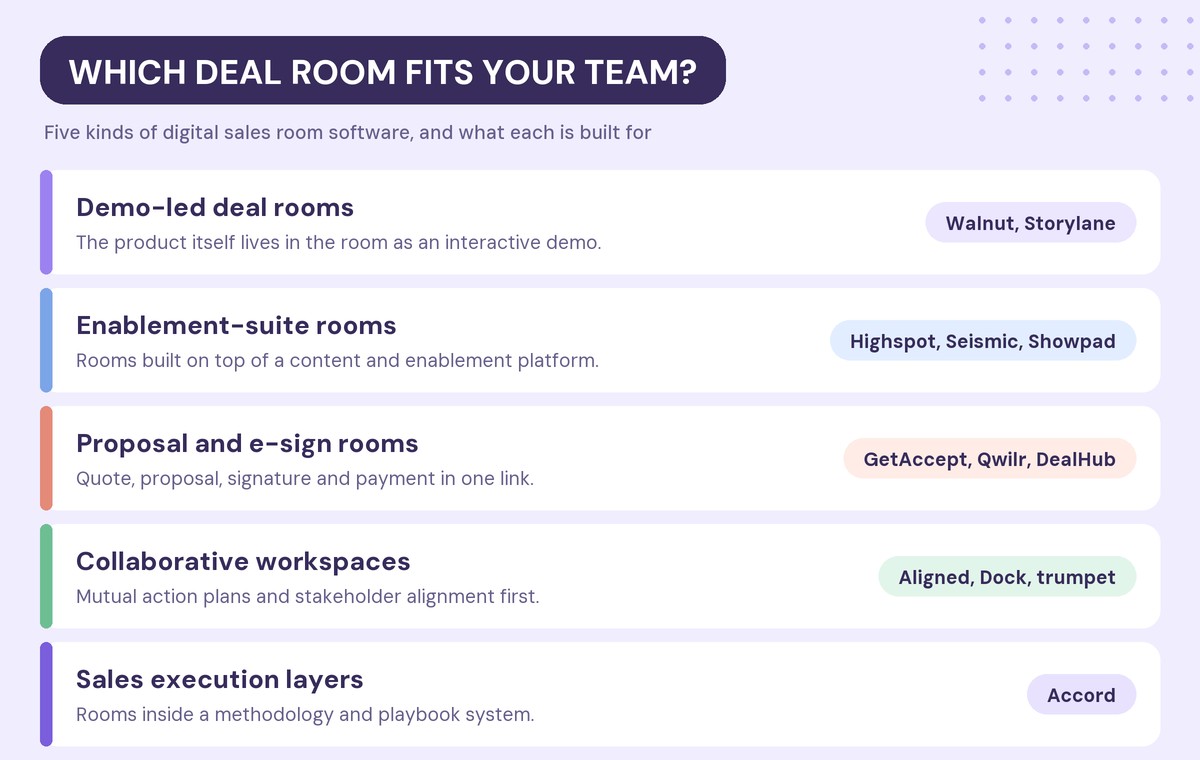
The 12 best digital sales room tools in 2026
1. Walnut: best for demo-led deal rooms
Walnut’s Deal Rooms are built around one idea: buyers should be able to see the product working inside the room, not just read about it. Each room can include live, personalized interactive demos (clickable, self-guided product walkthroughs) next to the files, plan and pricing the deal needs.
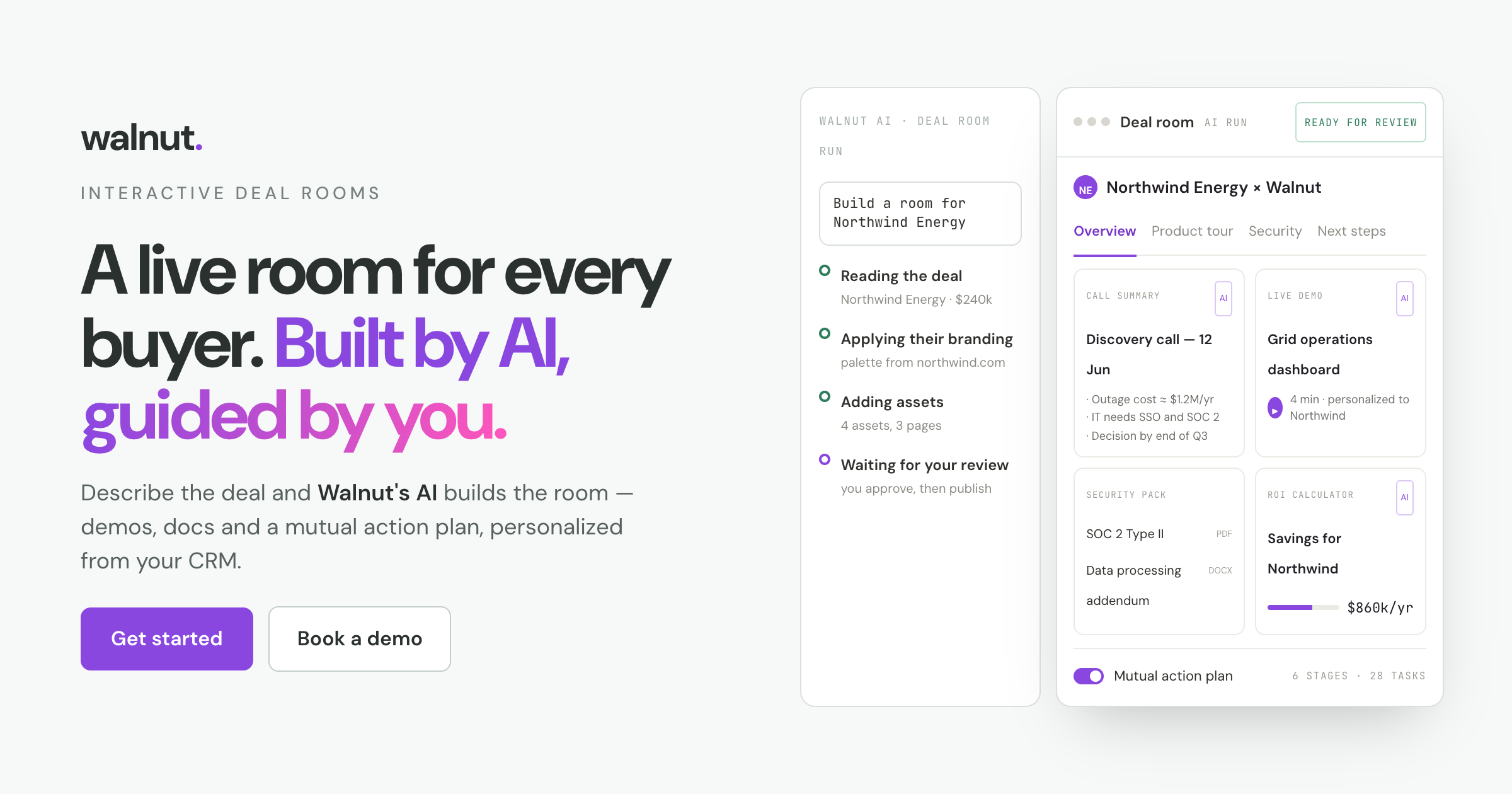
Rooms are built by AI. A rep describes the deal, and Walnut drafts the pages, copy and branding, pulling deal context from Salesforce or HubSpot. Key features include:
- AI-built rooms created from CRM properties, including rooms for accounts without an opportunity yet.
- A mutual action plan drafted from the deal, with stages, tasks, owners and dates buyers can tick off.
- Embedded interactive demos, inline Excel, PowerPoint and Word files, and a security section for documents like SOC 2 reports.
- Gated pages, such as pricing, that stay hidden until a buyer requests access.
- Deal intelligence on views, shares and return visits, with flags for rising or stalled deals synced to the CRM.
- SOC 2 Type II, SSO and role-based access controls.
Walnut reports that customers close deals 34% faster with Deal Rooms, based on its own 2026 customer data. For a real example, see how one deal room feature brought a $200K deal back.
Pricing: paid plans start at $575 per month, billed annually. Enterprise pricing is custom.
Trade-off: Walnut is built for B2B teams that sell a product buyers need to see. Teams that only need an e-signature flow or a content portal may not use the demo layer.
2. GetAccept: best for rooms that end in a signature
GetAccept started in e-signature and grew into a full digital sales room. It suits AEs and sales leaders who want the room and the contract in the same place, from SMB to enterprise.
- Native e-signature with typed and handwritten signatures, plus advanced and qualified signature options.
- Mutual action plans and stakeholder tracking.
- In-room chat, meetings and file sharing.
- Engagement analytics across the buying committee.
Pricing: an eSign plan starts at $25 per user per month, and the Professional plan at $49 per user per month (minimum five users, annual agreement). Enterprise pricing is custom, and a free trial is available.
Trade-off: teams coming from a pure e-signature workflow can face a ramp-up when they adopt the full room.
3. Aligned: best for collaborative mutual action plans
Aligned positions itself as an AI deal workspace for B2B sales and customer success teams, with a strong focus on mid-market and enterprise deals.
- Mutual action plans and a stakeholder map at the center of every room.
- One link, no buyer login required.
- AI agents for sellers, a buyer-facing agent that answers questions, and a deal builder.
- Integrations with Salesforce, HubSpot, Gong and Slack.
Pricing: a free Starter plan covers up to four rooms per seat. Paid plans start at about $29 per seat per month, billed annually.
Trade-off: reviewers on G2 most often point to limited customization and design control.
4. Dock: best for one workspace across sales, onboarding and enablement
Dock bundles deal rooms into a broader revenue enablement system that also covers client portals, onboarding, order forms, content management and training.
- AI-generated deal rooms with success criteria, next steps and phased timelines.
- Notifications when stakeholders view the room.
- Order forms with signing status.
- Salesforce and HubSpot integrations.
Pricing: a free plan is available. The Standard plan costs $350 per month for five seats, and Premium costs $1,000 per month for ten seats, both billed annually. External buyers are free.
Trade-off: reviewers mention limited customization and a learning curve when building templates.
5. Highspot: best for enterprises already on Highspot
Highspot’s Digital Sales Rooms extend its enablement platform into buyer-facing spaces. Highspot now operates as part of Seismic, so both products in this list share a parent company.
- Mutual action plans, with Slack, Teams and calendar connections.
- Security controls such as passwords, watermarking, email verification and domain restrictions.
- Templates and engagement analytics.
- AI content generation and a deal agent that surfaces risk and champion signals.
Pricing: contact sales. Digital Sales Rooms are included from the entry tier.
Trade-off: the room is one part of a large enablement suite, so it makes the most sense for teams that already use Highspot for content.
6. Seismic: best for brand control at enterprise scale
Seismic Digital Sales Rooms sit inside the Seismic Enablement Cloud and suit enterprise marketing and enablement teams that need tight control over brand and content.
- Drag-and-drop room design with video introductions.
- Comments, threads and buyer questions inside the room.
- Engagement alerts for sellers.
- Brand and content governance, with password protection and no Seismic account needed for buyers.
Pricing: contact sales.
Trade-off: like Highspot, the room is an add-on to a broad suite, and pricing is sales-led.
7. Showpad: best for content-heavy enablement teams
Showpad’s DSR is called Shared Spaces, and it is included across Showpad’s plans. It fits mid-market and enterprise teams that already manage sales content in Showpad.
- Mutual action plans with owners, due dates and notifications.
- Buyer uploads and meeting booking from inside the space.
- An approved-content library and templates.
- Buyer analytics with a management dashboard.
Pricing: quote-based, per user.
Trade-off: the DSR is one module of a broader enablement platform, and pricing is not published.
8. Accord: best for teams running a sales methodology
Accord describes itself as an execution layer for value selling. Its rooms are embedded in deal playbooks, which suits revenue leaders running a methodology such as MEDDPICC.
- Mutual action plans at the core of every deal.
- Rooms connected to playbooks and deal stages.
- AI that turns call transcripts and CRM data into next steps.
- Analytics on process adherence and multi-threading.
Pricing: the Starter plan starts at $99 per user per month plus a platform fee. Enterprise pricing is custom.
Trade-off: Accord is process-heavy. Teams that want a lightweight content room may find it more than they need.
9. trumpet: best for fast, free-to-start rooms
trumpet calls its rooms Pods and serves revenue teams from SDRs through customer success.
- An AI copilot that builds a Pod from a prompt.
- Mutual action plans and an AI engagement score.
- AI org charts for mapping the buying committee.
- E-signature on higher tiers, and 70+ integrations.
Pricing: a free plan includes ten Pods. Paid plans start at $45 per user per month.
Trade-off: reviewers mention limited CRM sync and templates, and a learning curve at the start.
10. Qwilr: best for proposal-led sales
Qwilr is a proposal tool that has grown into deal rooms. It suits teams that want the proposal, quote, signature and payment in one link.
- Rooms generated from CRM data with buyer details pre-filled.
- Built-in e-signature and payments.
- Interactive pricing tables and ROI calculators.
- Engagement analytics and pipeline reporting.
Pricing: plans start at $35 per user per month, billed annually, with a 14-day free trial. The Salesforce integration starts on the Scale plan.
Trade-off: Qwilr is proposal-first, and it does not list a collaborative mutual action plan.
11. Storylane: best for demo builders adding a buyer hub
Storylane is an interactive demo platform that added Hubs, a buyer-facing space for demos, PDFs, videos and embeds.
- AI room building with gallery or playlist layouts.
- An AI agent that answers buyer questions inside the hub.
- Per-stakeholder engagement tracking with Slack and Teams alerts.
- Custom domains, SSO and SOC 2.
Pricing: Hubs sit on Storylane’s higher-tier plans. Confirm the current packaging with sales.
Trade-off: the hub is a newer extension of a demo-building tool, and mutual action plans and e-signature are not listed.
12. DealHub: best for quote-to-revenue teams
DealHub’s DealRoom is a module of its CPQ, contract and billing platform, so it fits mid-market and enterprise teams that run quoting in DealHub.
- Digital proposals and contracts, with multi-option quotes.
- Real-time buyer intent signals.
- Buyer and seller chat.
- DocuSign integration, with email and Slack notifications.
Pricing: contact sales.
Trade-off: the room is a component of a CPQ suite rather than a standalone DSR.
How do you choose the right digital sales room software?
Start with the job the room has to do in your deals. A team selling a complex product to a six-person buying committee needs something different from a team closing two-week deals on a proposal.
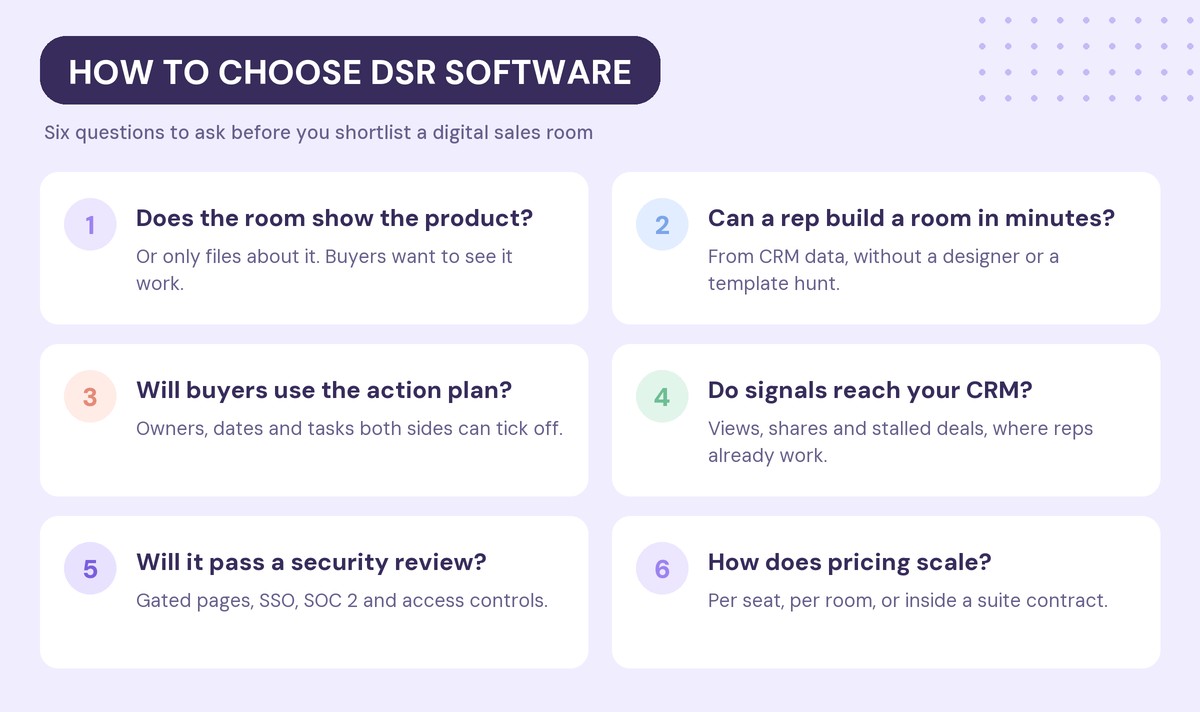
Six questions narrow most shortlists quickly:
- Does the room show the product? If buyers need to see your product working to say yes, a room full of PDFs pushes the most important step back into a live call. Our take on why static DSRs fall short without interactive demos goes deeper.
- Can a rep build a room in minutes? Rooms only get used when they are fast to create. AI drafting and CRM-driven creation matter more than design options.
- Will buyers use the action plan? A mutual action plan only works if both sides can see and update it without logging in.
- Do signals reach your CRM? Engagement data that lives in another dashboard gets ignored. Look for CRM sync and alerts where reps already work.
- Will it pass a security review? Enterprise buyers will ask about SSO, SOC 2, access controls and gated pages.
- How does pricing scale? Compare cost at your real seat count and room volume, not the entry price.
How much does digital sales room software cost?
Pricing models fall into four groups, and the right one depends on how many sellers will build rooms.
- Free plans: Aligned, Dock and trumpet offer free entry plans with limits on rooms or features. They are useful for a pilot, less so for a full team rollout.
- Per-seat pricing: GetAccept, Aligned, Accord, trumpet and Qwilr charge per user, typically between $29 and $99 per user per month on paid tiers, with minimum seat counts on some plans.
- Team plans: Dock and Walnut publish plan-level prices for a team, which can be cheaper per rep as you grow.
- Suite contracts: Highspot, Seismic, Showpad and DealHub price their rooms as part of a broader platform, and pricing is quote-based.
The entry price rarely tells the full story. Seat minimums, annual commitments, gated integrations and the cost of the platform around the room all change the real number.
Is a digital sales room the same as a sales enablement platform?
No. A sales enablement platform helps your own team find, manage and present content. A digital sales room is buyer-facing: it is where the buying committee reviews content, follows the plan and makes the decision.
Some vendors sell both, which is why Highspot, Seismic and Showpad appear in this list. If you already run one of those platforms, its room may be the simplest add. If you are choosing fresh, decide whether you need an internal content system at all. We break down the difference between DSRs and enablement platforms in a separate guide.
Frequently asked questions
What is the best digital sales room software in 2026?
The best digital sales room software depends on the job the room has to do. Walnut fits teams that need buyers to see the product inside the room, GetAccept and Qwilr fit deals that end in a signed proposal, Aligned and Dock fit collaborative planning, and Highspot, Seismic and Showpad fit enterprises already on those enablement platforms.
What features should a digital sales room have?
A digital sales room should have fast room creation, a mutual action plan with owners and dates, engagement analytics that sync to your CRM, and security controls such as SSO and gated pages. In 2026, AI-built rooms and buyer-facing AI agents are also becoming common.
How much does a digital sales room cost?
Digital sales room software ranges from free plans to enterprise contracts. Paid per-seat plans typically cost between $29 and $99 per user per month, team plans start at a few hundred dollars per month, and enterprise enablement suites are priced by quote.
Is there a free digital sales room tool?
Yes. Aligned, Dock and trumpet offer free plans with limits on the number of rooms, seats or features. They work well for testing the concept before rolling a DSR out to a full sales team.
Do buyers need an account to use a digital sales room?
In most tools, no. Buyers usually open a room from a single link without creating an account, and some tools add email verification or passwords for sensitive deals.
Can you put a product demo inside a digital sales room?
Yes. Some DSRs, including Walnut, embed live interactive demos directly in the room, so buyers can click through the product on their own. Others only support recorded videos or links to a demo hosted elsewhere.
Ready to give every buyer a room they will actually use? Start for free with Walnut.