Key takeaways
- Interactive demo security comes down to five questions: what data is in the captured screens, who can open the demo, how your team signs in, what compliance paperwork exists, and what the AI does with your content.
- Captured demos copy real product screens, so the biggest risk is customer data that ends up in a demo by accident. Blurring and anonymizing before publishing is the first control to check.
- Link-level controls matter more than most teams expect: allow and block lists, access codes, expiration dates, email verification and the ability to pause a link.
- Enterprise IT reviewers will ask for SSO, SCIM, role-based access, a SOC 2 Type II report, a data processing agreement and a sub-processor list.
- Buyer-facing AI adds a new set of questions: does the vendor train models on your data, does the agent answer only from approved content, and can you run AI on your own model keys.
- Treat the demo platform like any other system that holds product and customer data, and get the security review started before the deal depends on it.
Enterprise deals rarely stall on the demo itself. They stall three weeks later, when the buyer’s security team sends a questionnaire and asks a simple question nobody prepared for: what exactly is in that interactive demo you sent us, and who else can open it?
Interactive demos (clickable, self-guided product walkthroughs captured from your real product) are now a standard part of enterprise sales. Prospects forward them to colleagues, embed them in internal business cases and revisit them weeks after the first call. That reach is the point. It is also why security, legal and IT teams increasingly review the demo platform the same way they review any other SaaS vendor.
This checklist covers interactive demo security from both sides of the table: what a security reviewer will ask, and what your team should have in place before they ask. It is written for revenue leaders, sales engineers and the marketing and enablement teams who own the demo library.
Why do security teams care about interactive demos?
Security teams care because interactive demos are built from real product screens, and real product screens often contain real data. A demo captured from a production account can carry customer names, email addresses, revenue figures or internal notes into a link that travels far beyond the original buyer.
There are three distinct exposure points:
- Your data in the demo. Anything visible on a captured screen becomes part of the demo unless someone removes it.
- Who can open the link. A demo shared with one champion can be forwarded to a competitor, a former employee or a personal inbox.
- What the vendor does with it. The demo platform stores your product content, viewer data and, increasingly, AI conversations with buyers.
The first two are mostly about how your team uses the platform. The third is about the vendor itself, and it is where most security questionnaires focus.
The interactive demo security checklist
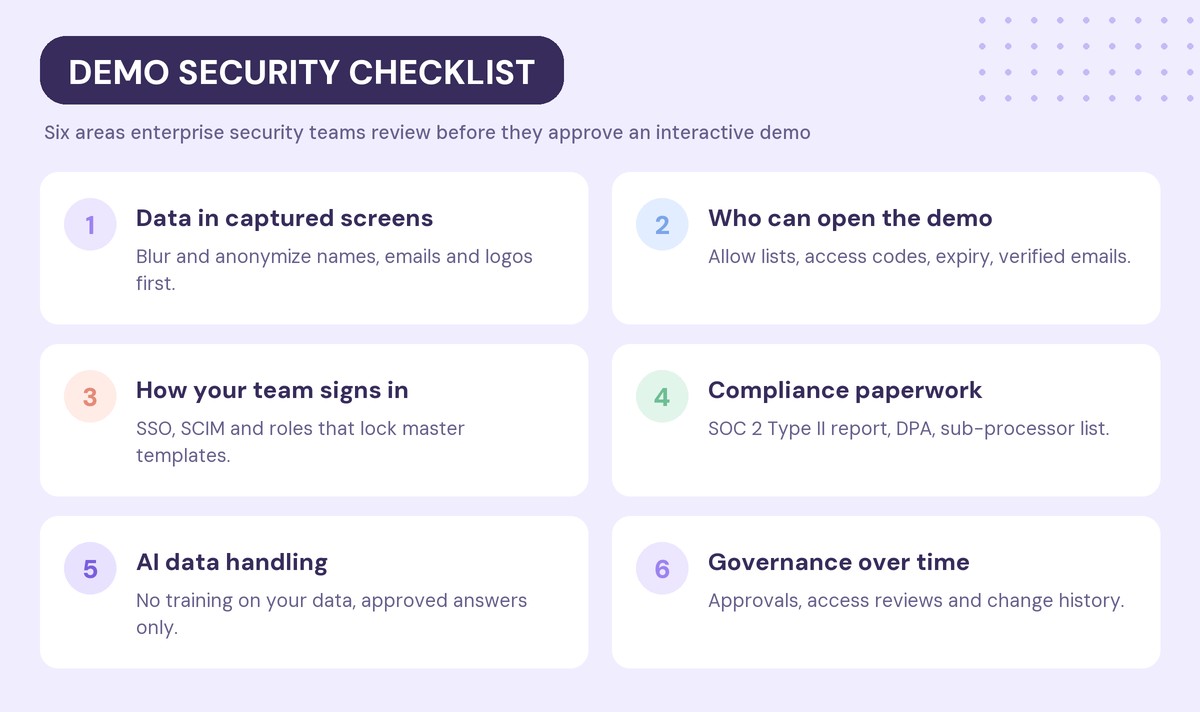
Use the six areas below as a working checklist. Each one lists what reviewers ask and what good looks like.
1. Data in captured screens
Start with the content itself. Before any demo goes to a prospect, someone should check every screen for data that should not be there.
What to ask:
- Can you blur or hide individual elements on a captured screen?
- Can you replace real names, emails, addresses and logos with fictional ones across every screen at once?
- Can you swap hard-coded details for variables, so a demo shows the prospect’s company name instead of a real customer’s?
The safest habit is to capture from a demo or sandbox account rather than production. When that is not possible, anonymization tools inside the demo editor become your main control.
Make the check part of the build, not a final step. If your team creates demos with AI, add anonymization to the same pass that rewrites copy and adds guides, so no demo reaches the publish step with real data still on screen.
2. Who can open the demo
Link controls decide what happens after the demo leaves your hands. This is where most real-world exposure happens, because links get forwarded.
What to ask:
- Can you restrict a demo to specific email addresses or whole domains, and block others?
- Can you require an email before the demo opens, and verify that the email is real?
- Can you block personal email domains like Gmail and Outlook?
- Can you add an access code, set an expiration date or pause a link instantly?
- Can admins set these rules once for every demo, instead of relying on each rep to remember?
3. How your team signs in
Identity controls protect the workspace where demos are built and stored.
What to ask:
- Does the platform support SAML or OpenID single sign-on with your identity provider, such as Okta or Azure AD?
- Does it support SCIM, so people who leave your company lose access automatically?
- Does it have role-based access, so sales reps can share and personalize demos without editing the master templates?
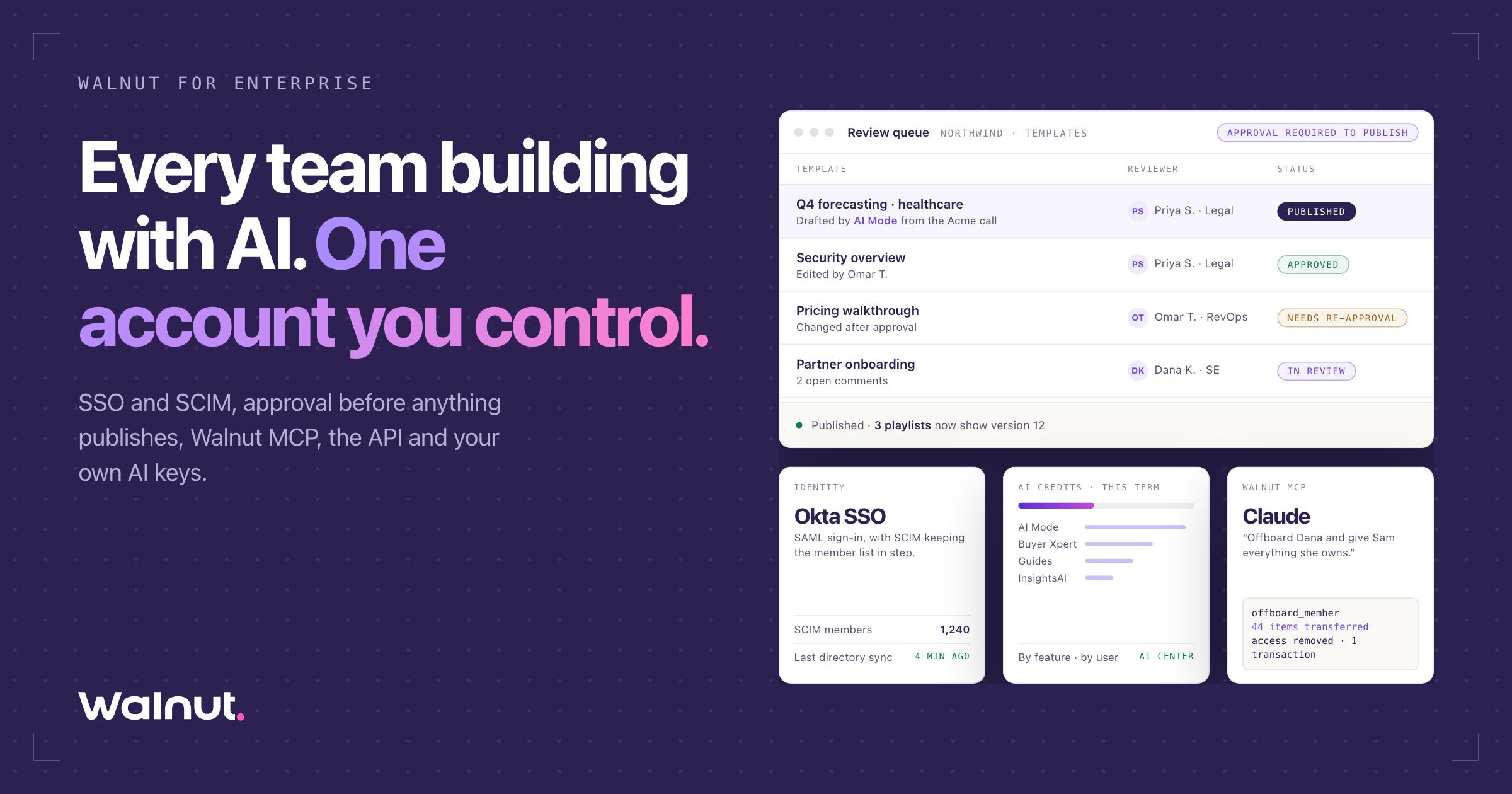
- Can you require approval before a template is published?
4. Compliance and paperwork
Security reviewers will want documents, not only features.
What to ask:
- Is the vendor SOC 2 Type II audited, and can you get the current report?
- Is there a data processing agreement (DPA) that covers GDPR and other privacy laws?
- Is personal data encrypted in transit and at rest?
- Is there a published list of sub-processors, with what each one does and where it processes data?
- Can you require cookie consent from demo viewers in regions that need it?
5. AI data handling
Buyer-facing AI is the newest item on security questionnaires, and the one vendors answer least consistently. If a demo platform uses AI to build demos or to answer buyer questions, ask:
- Does the vendor train general AI models on your content? The answer should be in the contract, not only on a web page.
- Does a buyer-facing AI agent answer only from content you approved, or from general knowledge?
- Can you block topics, such as pricing exceptions or roadmap promises, and route them to a person?
- Can admins turn AI features on or off for the whole workspace?
- Can you run AI features on your own model provider keys, and control what the vendor stores?
6. Governance over time
The last area is the one most teams forget: keeping the library safe as it grows.
What to ask:
- Can you see who has access to what, and clean it up in bulk?
- Can you export the library and user list for an access review?
- Is there a record of who changed sensitive settings?
How Walnut handles each part of the checklist
Walnut was built for B2B teams that sell to enterprise buyers, so most of these controls are part of the core product. Here is how each area maps to what Walnut documents publicly.
Data in captured screens
In the Walnut editor, you can blur any element on a captured screen by selecting it, right-clicking and choosing Blur. Variables replace hard-coded details, such as a customer’s company name, across every screen in one flow.
AI Mode, Walnut’s conversational editor, can also blur or anonymize names, emails, addresses and logos, and randomize identifying information, which is useful for teams in healthcare, finance and other regulated industries.
Who can open the demo
Every Walnut demo has a Who can open it setting with three link access options: anyone with the link, specific people, or no one, which pauses the demo for everyone. On top of that, Walnut documents:
- Allow and block lists of individual emails or whole domains, per demo or as a company-wide default set by admins.
- An access code that viewers type before the demo opens.
- An expiration date, after which the demo stops opening at the end of that day, UTC.
- Email gates, which are on by default for every demo, plus email verification, where viewers open the demo only after clicking a one-time link sent to their inbox.
- A Non-Work Domain Access setting that controls whether personal addresses like Gmail can get through the gate.
The same email gates apply to Playlists and Deal Rooms, so the controls follow the content wherever reps share it.
How your team signs in
Walnut supports SSO and SCIM with custom SAML and OpenID connections and most identity providers, including Okta and Azure AD, after you verify your email domain. SSO and SCIM are a paid feature, so check your plan.
Walnut uses role-based access control with five roles: Account Owner, Admin, Editor, Presenter and Viewer. Presenters can personalize and share demos but cannot edit demo templates, which keeps the master content locked down. Admins can also turn on approval before publishing, so no template goes out until a named approver signs off.
Compliance and paperwork
According to the Walnut for Enterprise page, Walnut is SOC 2 Type II audited, and your account team can share the current report. For GDPR, you can require cookie consent across every demo, playlist and Deal Room, and Walnut’s team handles viewer data requests. The demo player itself uses only strictly necessary cookies, not marketing or analytics cookies.
Walnut’s Data Processing Agreement commits to encrypting personal data in transit and at rest, and lists every sub-processor, what it does and where it processes data. Security policies can be requested through security.walnut.io. Teams that serve demos from their own domain can use the custom domain add-on, which includes automatic SSL.
AI data handling
Walnut’s DPA states that Walnut will not process customer data to train any large language model or other general AI model. The only exception is grounding or improving your own AI agent’s answers, based solely on your knowledge base and solely to provide the service to you.
For buyer-facing AI, Buyer Xpert answers buyer questions inside the demo only from content you approve, such as documentation, pricing, integrations and FAQs. When it does not know an answer, it says so. Admins name the topics it must not discuss and route them to a person.
AI stays under admin control. AI access in the editor is off by default until an admin enables it in Company Settings, and Buyer Xpert is switched on by an admin in the AI Center, then per demo. Teams with stricter policies can use bring your own key to run Walnut’s AI features on their own OpenAI, Anthropic, Google or xAI accounts. With BYOK, admins choose whether Walnut stores prompts and responses or only metadata, and every change to the setup is recorded in a change history.
Governance over time
Admins can manage access in bulk with Groups, export the library to CSV for content audits, and on Scale and Enterprise plans audit members and seats through the Walnut API.
What should you prepare before the security review?
The fastest security reviews are the ones where the seller sends the answers before the questions arrive. Build a short security pack and keep it ready for every enterprise deal:
- The vendor’s SOC 2 Type II report, requested from your demo vendor in advance.
- The DPA and sub-processor list, linked rather than attached, so the buyer always sees the current version.
- A one-page summary of your demo settings: who can open demos, whether email verification is on, how long links last and whether personal domains are blocked.
- Your AI answer: whether buyer-facing AI is on, what content it answers from and which topics it routes to a person.
- An internal rule for captured data: capture from demo accounts, and blur or anonymize anything else before publishing.
If you share demos inside a digital sales room, put the security pack in the same room, so procurement and IT find it without asking.
How often should you review demo access?
Review demo access on the same schedule as your other customer-facing systems, and at least once a quarter. A good review takes under an hour and covers three things.
First, check the workspace: who has admin or editor rights, and whether anyone who left the company still has an account. SCIM handles departures automatically, but a manual check catches contractors and agency users. Second, check the links: which deal-specific demos are still open after the deal closed, and whether they should expire. Third, check the AI settings: which features are on, what content buyer-facing AI answers from, and whether the blocked topics still match your sales policy.
Common interactive demo security mistakes
Most demo security problems are process problems, not product gaps. These are the ones that come up most often:
- Capturing from production. It is fast, and it is how real customer data ends up in a prospect’s inbox.
- Leaving links open forever. A demo shared in a 2024 deal should not still open in 2026. Set expiration dates for deal-specific demos.
- Relying on reps to set access. Company-wide allow and block lists remove the guesswork.
- Ignoring personal email domains. If your demos are for business buyers, block them at the gate.
- Turning on AI without a policy. Decide what buyer-facing AI can answer, and what it must hand to a person, before you switch it on.
- Skipping the access review. People change teams and leave. Review who can edit templates and who can share demos at least once a quarter, and move finished builders back to a sharing-only role.
Sales engineers carry most of this work, which is one reason demo prep time matters. Our list of the best tools for sales engineers covers the rest of the presales stack.
Frequently asked questions
Are interactive demos secure enough for enterprise sales?
Yes, when the platform has the right controls and the team uses them. Look for blurring and anonymization, link-level access controls such as allow lists and expiration dates, SSO and SCIM, a SOC 2 Type II report and a data processing agreement. Most risk comes from real data captured into demos, so anonymize before publishing.
How do I stop prospects from forwarding a demo to people outside their company?
Restrict the demo to specific email addresses or the buyer’s domain, require an email before it opens and turn on email verification, so viewers must click a one-time link. Adding an expiration date limits how long a forwarded link keeps working.
Can I hide customer data in a captured demo?
Yes. In Walnut, you can blur any element on a captured screen, replace hard-coded details with variables, and use AI Mode to anonymize names, emails, addresses and logos across the demo. The safest approach is to capture from a demo account in the first place.
Does Walnut train AI models on our data?
No. Walnut’s Data Processing Agreement states that Walnut will not process customer data to train any large language model or other general AI model. The only exception is improving your own AI agent’s answers from your own knowledge base, solely to provide the service to you.
Is Walnut SOC 2 compliant?
Yes. Walnut is SOC 2 Type II audited, and your Walnut account team can share the current report. Walnut’s DPA and sub-processor list are published at walnut.io/dpa.
What should an interactive demo security questionnaire include?
A good questionnaire covers five areas: data in captured screens, who can open demos, how employees sign in, compliance documents such as SOC 2 and the DPA, and how the vendor handles AI, including whether it trains on customer data and what buyer-facing agents can answer.
Ready to give enterprise buyers demos your security team will sign off on? Start for free with Walnut.